❯
- ❯Market Explorer
- ❯Collections
- ❯Chrome Extension
- ❯API
- ❯App timeline
- ❯Blog
- ❯Partners
Top Paid Personalization Apps in Canada
Top 10 Apps

LineX White Icon Pack
LineX White Icon Pack
LineX White IconPack is the White Version of LineX and LimeLine Iconpack. It's one of the freshest icon packs you could think of.
LineX White Icon Pack has a unique Line style from up-close, the icons look like they're really unique and out of the box , which makes for a stunningly-different look in the digital age. There are over 5500+ icons as well as a multitude of high-quality wallpapers to complement the look with Line icons.
Complement your mobile screen with exclusive Line Icons. Each icon is a real masterpiece and designed in order to create a perfect and pure Unique Lineal Style Experience. Every linear icons have been designed with a Perfect blend of creativity with creativity enhancing your mobile experience.
And, Yes
This is might be the best linear style icon pack available in market. with lots of icons and beautiful masks for unthemed icons
An average user checks their device more than a 50 times in a day. make each time a real pleasure with this LineX Icon pack. Get the LineX White Now!
LineX White Icon pack is still new with 5500+ Icons. I can assure you to add lot more icons in every update.
Why Choose LineX White Icon Pack over other Packs?
• 5500+ ICONS WITH TOP NOTCH QUALITY.
• Frequent Updates
• Perfect Masking system
• Lots of alternative icon
• Amazing Wall collection
Personal Recommended Settings and Launcher
• Use Nova Launcher
• Set Icon Normalization Off From the Nova Launcher Settings
• Set Icon Size to 100% - 120%
Other Features
• Icon preview &search.
• Dynamic Calendar
• Material Dashboard.
• Custom folder icons
• Category-based Icons
• Custom app drawer icons.
• Easy Icon Request
Still Confuse?
Undoubtedly, LineX White Icon Pack is best in Line style icon packs. and we do offer a 100% refund in case you didn't like it. So Nothing to worry about. Don't like it? Contact me via email.
Support
If you have any issue with using Icon pack. Just email me at justnewdesigns@gmail.com
How to use this Icon pack?
Step 1 : Install supported theme Launcher
Step 2 : Open LineX White Icon Pack and Go to Apply section and Select Launcher to apply.
If your launcher is not in a list make sure you apply it from your launcher settings
DISCLAIMER
• A supported launcher is required to use this icon pack!
• FAQ section inside the app which answers a lot of questions you may have. Please read it before you emailing your question.
Icon Pack Supported Launchers
Action Launcher • ADW Launcher • Apex Launcher •Atom Launcher • Aviate Launcher • CM Theme Engine • GO Launcher • Holo Launcher • Holo Launcher HD • LG Home • Lucid Launcher • M Launcher • Mini Launcher • Next Launcher • Nougat Launcher •Nova Launcher(recommended) • Smart Launcher •Solo Launcher •V Launcher • ZenUI Launcher •Zero Launcher • ABC Launcher •Evie Launcher • L Launcher • Lawnchair
Icon Pack Supported Launchers not Included in Apply Section
Arrow Launcher • ASAP Launcher •Cobo Launcher •Line Launcher •Mesh Launcher •Peek Launcher • Z Launcher • Launch by Quixey Launcher • iTop Launcher • KK Launcher • MN Launcher • New Launcher • S Launcher • Open Launcher • Flick Launcher • Poco Launcher
This icon pack has been tested, and it works with these launchers. However, it may also work with others too.In case you do not found an apply section in dashboard. You can apply icon pack from a theme setting.
Extra Notes
• Icon pack needs a launcher in order to work.
• Google Now Launcher do not support any icon packs.
• Missing an Icon? feel free to send me an icon request and I will try to update this pack with your requests.
Contact Me
Google+: https://plus.google.com/communities/110791753299244087681
Twitter : https://twitter.com/justnewdesigns
CREDITS
• Jahir Fiquitiva for providing such a great dashboard. LineX White Icon Pack , a leading app in the Personalization Apps category, boasts a robust user base with a total of 59M installs. It sees impressive engagement 23K daily installs, reflecting its popularity and usability. The app generates significant monthly revenue, indicative of its effective monetization strategies and user satisfaction. The app supports in-app purchases, allowing users to enhance their experience with additional features and content. LineX White Icon Pack was first released April 24, 2019, and has been continually updated, with the latest update rolled out just January 28, 2026. This commitment to regular updates ensures that users always have access to the latest features and improvements. The app and is currently on version 7.1. With 85 reviews, LineX White Icon Pack maintains a strong presence in the market, supported by numerous rating votes that attest to its reliability and effectiveness in helping users achieve their Top charts paid play goals.
LineX White Icon Pack has a unique Line style from up-close, the icons look like they're really unique and out of the box , which makes for a stunningly-different look in the digital age. There are over 5500+ icons as well as a multitude of high-quality wallpapers to complement the look with Line icons.
Complement your mobile screen with exclusive Line Icons. Each icon is a real masterpiece and designed in order to create a perfect and pure Unique Lineal Style Experience. Every linear icons have been designed with a Perfect blend of creativity with creativity enhancing your mobile experience.
And, Yes
This is might be the best linear style icon pack available in market. with lots of icons and beautiful masks for unthemed icons
And do you know?
An average user checks their device more than a 50 times in a day. make each time a real pleasure with this LineX Icon pack. Get the LineX White Now!
There's always something new:
LineX White Icon pack is still new with 5500+ Icons. I can assure you to add lot more icons in every update.
Why Choose LineX White Icon Pack over other Packs?
• 5500+ ICONS WITH TOP NOTCH QUALITY.
• Frequent Updates
• Perfect Masking system
• Lots of alternative icon
• Amazing Wall collection
Personal Recommended Settings and Launcher
• Use Nova Launcher
• Set Icon Normalization Off From the Nova Launcher Settings
• Set Icon Size to 100% - 120%
Other Features
• Icon preview &search.
• Dynamic Calendar
• Material Dashboard.
• Custom folder icons
• Category-based Icons
• Custom app drawer icons.
• Easy Icon Request
Still Confuse?
Undoubtedly, LineX White Icon Pack is best in Line style icon packs. and we do offer a 100% refund in case you didn't like it. So Nothing to worry about. Don't like it? Contact me via email.
Support
If you have any issue with using Icon pack. Just email me at justnewdesigns@gmail.com
How to use this Icon pack?
Step 1 : Install supported theme Launcher
Step 2 : Open LineX White Icon Pack and Go to Apply section and Select Launcher to apply.
If your launcher is not in a list make sure you apply it from your launcher settings
DISCLAIMER
• A supported launcher is required to use this icon pack!
• FAQ section inside the app which answers a lot of questions you may have. Please read it before you emailing your question.
Icon Pack Supported Launchers
Action Launcher • ADW Launcher • Apex Launcher •Atom Launcher • Aviate Launcher • CM Theme Engine • GO Launcher • Holo Launcher • Holo Launcher HD • LG Home • Lucid Launcher • M Launcher • Mini Launcher • Next Launcher • Nougat Launcher •Nova Launcher(recommended) • Smart Launcher •Solo Launcher •V Launcher • ZenUI Launcher •Zero Launcher • ABC Launcher •Evie Launcher • L Launcher • Lawnchair
Icon Pack Supported Launchers not Included in Apply Section
Arrow Launcher • ASAP Launcher •Cobo Launcher •Line Launcher •Mesh Launcher •Peek Launcher • Z Launcher • Launch by Quixey Launcher • iTop Launcher • KK Launcher • MN Launcher • New Launcher • S Launcher • Open Launcher • Flick Launcher • Poco Launcher
This icon pack has been tested, and it works with these launchers. However, it may also work with others too.In case you do not found an apply section in dashboard. You can apply icon pack from a theme setting.
Extra Notes
• Icon pack needs a launcher in order to work.
• Google Now Launcher do not support any icon packs.
• Missing an Icon? feel free to send me an icon request and I will try to update this pack with your requests.
Contact Me
Google+: https://plus.google.com/communities/110791753299244087681
Twitter : https://twitter.com/justnewdesigns
CREDITS
• Jahir Fiquitiva for providing such a great dashboard. LineX White Icon Pack , a leading app in the Personalization Apps category, boasts a robust user base with a total of 59M installs. It sees impressive engagement 23K daily installs, reflecting its popularity and usability. The app generates significant monthly revenue, indicative of its effective monetization strategies and user satisfaction. The app supports in-app purchases, allowing users to enhance their experience with additional features and content. LineX White Icon Pack was first released April 24, 2019, and has been continually updated, with the latest update rolled out just January 28, 2026. This commitment to regular updates ensures that users always have access to the latest features and improvements. The app and is currently on version 7.1. With 85 reviews, LineX White Icon Pack maintains a strong presence in the market, supported by numerous rating votes that attest to its reliability and effectiveness in helping users achieve their Top charts paid play goals.

Raven Dark Icon Pack
Raven Dark Icon Pack
Immerse your Android device in an elegant and mysterious aura with Raven Dark Icon Pack.This precisely crafted collection boasts a captivating blend of dark, sleek, and minimalist designs, transforming your home screens into a captivating nocturnal landscape.
Transform your Android device with the Raven Dark Icon Pack! Featuring a sleek and mysterious collection of dark-themed icons, this pack is perfect for those who love a minimalist and elegant aesthetic.
Customize your home screen and app icons with ease, and enjoy a unique look that stands out. Compatible with most Android launchers, it's never been simpler to give your device a fresh, dark makeover.
Key Features:
Hundreds of Unique Icons:
Enjoy a vast (6500++) library of exquisitely designed icons, precisely crafted to complement a wide range of popular launchers. Includes alternate Icons for popular apps.
Dark and Moody Aesthetic:
Embrace the allure of the night with a colour palette dominated by deep blacks, greys, and subtle hints of vibrant colour accents.
Minimalist Design:
Experience a clean and uncluttered look that prioritizes functionality and visual harmony.
Regular Updates:
Updates includes each and every icon request by the Users.
Cloud-Based Wallpapers :
Access a curated selection of stunning 15 dark wallpapers to perfectly complement the icon pack's aesthetic.
Icon Request Tool: Easily request icons for apps not yet included in the pack.
So what are you waiting for. Download Raven Dark iconpack today and experience the captivating allure of a truly unique and stylish Android interface.
Elevate your phone's style with icon customization, launcher themes, and unique designs. Experience the beauty of high-resolution icons, modern UI, and trendy themes. Make your device truly yours with the ultimate icon pack for a stylish and chic home screen.
Discover the power of personalization, dark mode, HD icons, and seamless integration. Upgrade your interface with icon packs, dark aesthetics, exclusive designs, and home screen setup.
Enjoy smooth performance and a refined interface that redefines your device's look and feel.
Experience Android with a touch of dark elegance.
Compatible Launchers:
Icon Pack Supported Launchers
Action Launcher • ADW Launcher • Apex Launcher •Atom Launcher • Aviate Launcher • CM Theme Engine • GO Launcher • Holo Launcher • Holo Launcher HD • LG Home • Lucid Launcher • M Launcher • Mini Launcher • Next Launcher • Nougat Launcher •Nova Launcher(recommended) • Smart Launcher •Solo Launcher •V Launcher •Zero Launcher • ABC Launcher •Evie Launcher • L Launcher • Lawnchair
Icon Pack Supported Launchers not Included in Apply Section
Arrow Launcher • ASAP Launcher •Cobo Launcher •Line Launcher •Mesh Launcher •Peek Launcher • Z Launcher • Launch by Quixey Launcher • iTop Launcher • KK Launcher • MN Launcher • New Launcher • S Launcher • Open Launcher • Flick Launcher • Poco Launcher • Niagra Launcher
To use this Icon pack?
Step 1 : Install supported theme Launcher
Step 2 : Select desired Icon pack and Apply.
If your launcher is not in the list you can apply it from launcher settings.
Samsung users:
Need Android 12 with Samsung One UI 4.0 (or newer). To apply icon on Samsung One UI 4.0 or newer. You need to download Theme Park app(FREE) from GOOD LOCK on Samsung store.
Warnings: Before you Buy.
• Google Now Launcher do not support any icon packs.
• A supported Launcher is Required.
Contact:
Email : screativepixels@gmail.com
Twitter: https://twitter.com/Creativepixels7 Raven Dark Icon Pack , a leading app in the Personalization Apps category, boasts a robust user base with a total of 14M installs. It sees impressive engagement 62K daily installs, reflecting its popularity and usability. The app generates significant monthly revenue, indicative of its effective monetization strategies and user satisfaction. The app supports in-app purchases, allowing users to enhance their experience with additional features and content. Raven Dark Icon Pack was first released January 01, 2025, and has been continually updated, with the latest update rolled out just March 11, 2026. This commitment to regular updates ensures that users always have access to the latest features and improvements. The app and is currently on version 1.2.5. With 45 reviews, Raven Dark Icon Pack maintains a strong presence in the market, supported by numerous rating votes that attest to its reliability and effectiveness in helping users achieve their Top charts paid play goals.
Transform your Android device with the Raven Dark Icon Pack! Featuring a sleek and mysterious collection of dark-themed icons, this pack is perfect for those who love a minimalist and elegant aesthetic.
Customize your home screen and app icons with ease, and enjoy a unique look that stands out. Compatible with most Android launchers, it's never been simpler to give your device a fresh, dark makeover.
Key Features:
Hundreds of Unique Icons:
Enjoy a vast (6500++) library of exquisitely designed icons, precisely crafted to complement a wide range of popular launchers. Includes alternate Icons for popular apps.
Dark and Moody Aesthetic:
Embrace the allure of the night with a colour palette dominated by deep blacks, greys, and subtle hints of vibrant colour accents.
Minimalist Design:
Experience a clean and uncluttered look that prioritizes functionality and visual harmony.
Regular Updates:
Updates includes each and every icon request by the Users.
Cloud-Based Wallpapers :
Access a curated selection of stunning 15 dark wallpapers to perfectly complement the icon pack's aesthetic.
Icon Request Tool: Easily request icons for apps not yet included in the pack.
So what are you waiting for. Download Raven Dark iconpack today and experience the captivating allure of a truly unique and stylish Android interface.
Elevate your phone's style with icon customization, launcher themes, and unique designs. Experience the beauty of high-resolution icons, modern UI, and trendy themes. Make your device truly yours with the ultimate icon pack for a stylish and chic home screen.
Discover the power of personalization, dark mode, HD icons, and seamless integration. Upgrade your interface with icon packs, dark aesthetics, exclusive designs, and home screen setup.
Enjoy smooth performance and a refined interface that redefines your device's look and feel.
Experience Android with a touch of dark elegance.
Compatible Launchers:
Icon Pack Supported Launchers
Action Launcher • ADW Launcher • Apex Launcher •Atom Launcher • Aviate Launcher • CM Theme Engine • GO Launcher • Holo Launcher • Holo Launcher HD • LG Home • Lucid Launcher • M Launcher • Mini Launcher • Next Launcher • Nougat Launcher •Nova Launcher(recommended) • Smart Launcher •Solo Launcher •V Launcher •Zero Launcher • ABC Launcher •Evie Launcher • L Launcher • Lawnchair
Icon Pack Supported Launchers not Included in Apply Section
Arrow Launcher • ASAP Launcher •Cobo Launcher •Line Launcher •Mesh Launcher •Peek Launcher • Z Launcher • Launch by Quixey Launcher • iTop Launcher • KK Launcher • MN Launcher • New Launcher • S Launcher • Open Launcher • Flick Launcher • Poco Launcher • Niagra Launcher
To use this Icon pack?
Step 1 : Install supported theme Launcher
Step 2 : Select desired Icon pack and Apply.
If your launcher is not in the list you can apply it from launcher settings.
Samsung users:
Need Android 12 with Samsung One UI 4.0 (or newer). To apply icon on Samsung One UI 4.0 or newer. You need to download Theme Park app(FREE) from GOOD LOCK on Samsung store.
Warnings: Before you Buy.
• Google Now Launcher do not support any icon packs.
• A supported Launcher is Required.
Contact:
Email : screativepixels@gmail.com
Twitter: https://twitter.com/Creativepixels7 Raven Dark Icon Pack , a leading app in the Personalization Apps category, boasts a robust user base with a total of 14M installs. It sees impressive engagement 62K daily installs, reflecting its popularity and usability. The app generates significant monthly revenue, indicative of its effective monetization strategies and user satisfaction. The app supports in-app purchases, allowing users to enhance their experience with additional features and content. Raven Dark Icon Pack was first released January 01, 2025, and has been continually updated, with the latest update rolled out just March 11, 2026. This commitment to regular updates ensures that users always have access to the latest features and improvements. The app and is currently on version 1.2.5. With 45 reviews, Raven Dark Icon Pack maintains a strong presence in the market, supported by numerous rating votes that attest to its reliability and effectiveness in helping users achieve their Top charts paid play goals.

S4U Dive - Diver watch face
S4U Dive - Diver watch face
Experience the thrill of diving with our customizable diving themed watch face!
****
⚠️ IMPORTANT: Compatibility
This is a Wear OS Watch Face app and supports only smartwatches running Wear OS 5 or higher (Wear OS API 34+).
Compatible devices include:
- Samsung Galaxy Watch 4, 5, 6, 7, 8 (incl. Ultra and Classic Versions)
- Google Pixel Watch 1–3
- Other Wear OS 5+ smartwatches
If you experience any issues with installation or downloading, even on a compatible smartwatch:
1. Open the companion app provided with your purchase.
2. Follow the steps in the Install/Issues section.
Still need help? Feel free to email me at wear@s4u-watches.com for support.
****
✨ Key Features:
Ultra realistic design.
Wide range of color options for personalization.
Clear and easily readable display with high-contrast markings.
Two customizable complications.
Five customizable shortcuts.
Perfect for users who want a diving-themed watch face.
Completely black background is available as an option.
Dive into sophistication and elevate your Wear OS device with our unique and functional watch face. Download now and experience the difference!
****
🎨 CUSTOMIZATION OPTIONS
1. press and hold finger on the watch display.
2. press the button to adjust.
3. Swipe left or right to switch between the different customizable items.
4. Swipe up or down to change the options/color of the items.
- Color (14 different colors for battery indicator, day of the week and logo combined)
- Background Color (black, blue, mint, green, bordeaux, purple)
- Main Index Color (white, sky blue, mint, green, yellow, orange, pink)
- Index style (with numbers, without numbers, small marks)
- Hands (silver transparent, white, sky blue, mint, green, yellow, orange, pink)
- Logo (7 different logos + no logo)
- Pure Black (pure black background)
- AOD brightness (3 different brightness options)
****
Additional functionality:
The battery indicator is located in the upper right circle between 0 (0%) and 4 (100%) o'clock.
****
🌙 Always-On Display (AOD)
Important Notes:
- Using AOD will reduce battery life, depending on your smartwatch's settings.
- Some smartwatches may automatically dim the AOD display based on ambient light conditions.
⚙️ COMPLICATIONS & SHORTCUTS
Enhance your watch face with customizable app shortcuts and complications:
- App Shortcuts: Link to your favorite widgets for quick access.
- Editable Complications: Display the data you need most by customizing the visible values.
1. Press and hold the watch display.
2. Push the customize button.
3. Swipe from right to left until you reach the "complications".
4. 5 shortcuts and the 2 custom complications are highlighted. Click on it to set what you want here.
If you want to have more values inside of your complications list, check the Play Store for Wear OS complications.
****
📬 Stay Connected
If you enjoy this design, be sure to check out my other creations! I’m constantly working on new watch faces for Wear OS. Visit my website to explore more:
🌐 https://www.s4u-watches.com
Feedback & Support
I’d love to hear your thoughts! Whether it’s something you like, dislike, or a suggestion for future designs, your feedback helps me improve.
📧 For direct support, email me at: wear@s4u-watches.com
💬 Leave a review on the Play Store to share your experience!
Follow Me on Social Media
Stay up to date with my latest designs and updates:
📸 Instagram: https://www.instagram.com/matze_styles4you/
👍 Facebook: https://www.facebook.com/styles4you
▶️ YouTube: https://www.youtube.com/c/styles4you-watches
🐦 X: https://x.com/MStyles4you S4U Dive - Diver watch face , a leading app in the Personalization Apps category, boasts a robust user base with a total of 4M installs. It sees impressive engagement 2K daily installs, reflecting its popularity and usability. The app generates significant monthly revenue, indicative of its effective monetization strategies and user satisfaction. The app supports in-app purchases, allowing users to enhance their experience with additional features and content. S4U Dive - Diver watch face was first released February 13, 2023, and has been continually updated, with the latest update rolled out just August 12, 2025. This commitment to regular updates ensures that users always have access to the latest features and improvements. The app and is currently on version 1.0.8. With 12 reviews, S4U Dive - Diver watch face maintains a strong presence in the market, supported by numerous rating votes that attest to its reliability and effectiveness in helping users achieve their Top charts paid play goals.
****
⚠️ IMPORTANT: Compatibility
This is a Wear OS Watch Face app and supports only smartwatches running Wear OS 5 or higher (Wear OS API 34+).
Compatible devices include:
- Samsung Galaxy Watch 4, 5, 6, 7, 8 (incl. Ultra and Classic Versions)
- Google Pixel Watch 1–3
- Other Wear OS 5+ smartwatches
If you experience any issues with installation or downloading, even on a compatible smartwatch:
1. Open the companion app provided with your purchase.
2. Follow the steps in the Install/Issues section.
Still need help? Feel free to email me at wear@s4u-watches.com for support.
****
✨ Key Features:
Ultra realistic design.
Wide range of color options for personalization.
Clear and easily readable display with high-contrast markings.
Two customizable complications.
Five customizable shortcuts.
Perfect for users who want a diving-themed watch face.
Completely black background is available as an option.
Dive into sophistication and elevate your Wear OS device with our unique and functional watch face. Download now and experience the difference!
****
🎨 CUSTOMIZATION OPTIONS
1. press and hold finger on the watch display.
2. press the button to adjust.
3. Swipe left or right to switch between the different customizable items.
4. Swipe up or down to change the options/color of the items.
- Color (14 different colors for battery indicator, day of the week and logo combined)
- Background Color (black, blue, mint, green, bordeaux, purple)
- Main Index Color (white, sky blue, mint, green, yellow, orange, pink)
- Index style (with numbers, without numbers, small marks)
- Hands (silver transparent, white, sky blue, mint, green, yellow, orange, pink)
- Logo (7 different logos + no logo)
- Pure Black (pure black background)
- AOD brightness (3 different brightness options)
****
Additional functionality:
The battery indicator is located in the upper right circle between 0 (0%) and 4 (100%) o'clock.
****
🌙 Always-On Display (AOD)
Important Notes:
- Using AOD will reduce battery life, depending on your smartwatch's settings.
- Some smartwatches may automatically dim the AOD display based on ambient light conditions.
⚙️ COMPLICATIONS & SHORTCUTS
Enhance your watch face with customizable app shortcuts and complications:
- App Shortcuts: Link to your favorite widgets for quick access.
- Editable Complications: Display the data you need most by customizing the visible values.
1. Press and hold the watch display.
2. Push the customize button.
3. Swipe from right to left until you reach the "complications".
4. 5 shortcuts and the 2 custom complications are highlighted. Click on it to set what you want here.
If you want to have more values inside of your complications list, check the Play Store for Wear OS complications.
****
📬 Stay Connected
If you enjoy this design, be sure to check out my other creations! I’m constantly working on new watch faces for Wear OS. Visit my website to explore more:
🌐 https://www.s4u-watches.com
Feedback & Support
I’d love to hear your thoughts! Whether it’s something you like, dislike, or a suggestion for future designs, your feedback helps me improve.
📧 For direct support, email me at: wear@s4u-watches.com
💬 Leave a review on the Play Store to share your experience!
Follow Me on Social Media
Stay up to date with my latest designs and updates:
📸 Instagram: https://www.instagram.com/matze_styles4you/
👍 Facebook: https://www.facebook.com/styles4you
▶️ YouTube: https://www.youtube.com/c/styles4you-watches
🐦 X: https://x.com/MStyles4you S4U Dive - Diver watch face , a leading app in the Personalization Apps category, boasts a robust user base with a total of 4M installs. It sees impressive engagement 2K daily installs, reflecting its popularity and usability. The app generates significant monthly revenue, indicative of its effective monetization strategies and user satisfaction. The app supports in-app purchases, allowing users to enhance their experience with additional features and content. S4U Dive - Diver watch face was first released February 13, 2023, and has been continually updated, with the latest update rolled out just August 12, 2025. This commitment to regular updates ensures that users always have access to the latest features and improvements. The app and is currently on version 1.0.8. With 12 reviews, S4U Dive - Diver watch face maintains a strong presence in the market, supported by numerous rating votes that attest to its reliability and effectiveness in helping users achieve their Top charts paid play goals.

ILLUMINATOR Hybrid-LCD
ILLUMINATOR Hybrid-LCD
Ultra-realistic, highly customizable, and easy to read, this Illuminator-hybrid style watch face for Wear OS features 2 custom complications and beautiful night modes.
NOTE: Please read the how to section and installation section and check out the images !!!
ⓘ Features:
- Realistic design.
- Hybrdid-LCD watch.
- 4 (four) custom complications. * (IMPORTANT Read the Complicaiton Section below)
- Auto 12h/24h mode.
- 9 (nine) different Day themes.
- 8 (eight) different Night themes.
- 5 (five) hands for Day mode.
- Hear rate indicator (LCD).
- Steps indicator (LCD).
- London time.
- Time and date.
- Battery indicator.
- AM/PM indicator (LCD).
- Alway On Display.
- Three color themes for AOD.
- Three AOD hands colors.
ⓘ How to:
- To customize (chnage themes style) your watch face, touch and hold on the screen, then tap on customize.
- AOD (Always On Display) themes/hands. To change the AOD theme and/or hands select the second/first option in the "AOD Normal/Blue" and/or "AOD hands White/Blue".
ⓘ NIGHT themes How to:
-If you activate night themes and want to switch back to the day theme, simply go to the customization menu and select the first option under 'Night Color Themes' to turn it off. This is because night themes overlay day themes when activated.
* Preview for the AOD theme and Hands color might not be visible due to the way customizations work.
Don't miss out our top REALISTIC watch faces:
Milirary ZULU Tactical - https://play.google.com/store/apps/details?id=wb.military.zulu
Moon Master PRO - https://play.google.com/store/apps/details?id=wb.moon.master
ⓘ Installation
How to install: https://watchbase.store/static/ai/
After installation: https://watchbase.store/static/ai/ai.html
* Luna Benedicta watch face shown in "How to install" and "After installation". The same installation process is valid for all of our watch faces.
If you have any issues installing the watch face, please note that we have no control over the installation process.
In order to apply the watch face after you install it, touch and hold on the main screen (your current watch face) the swipe left to look for it. If you can't see it, tap on the " + " sign at the end (add a watch face) and find our watch face there.
We use a companion app for the phone to make the installation process easier. If you buy our watch face, tap on the install button (on the phone app) you must check your watch.. a screen will appear with the watch face.. tap install again and wait for the installation to finish. If you already bought the watch face and it still asks you to buy it again on the watch, don't worry you will not be charged twice. This is a common synchronization issue, just wait a little or try to restart your watch.
ⓘ Note: If you encounter any issues during installation, please contact our support team for assistance at support@belvek.com
ⓘ Complications:
- Illuminator Hybrid-LCD offers two compication located in the upper LCD screen on the left and right side. To change them tap and hold on the watch face and tap Customize, then scroll right and choose which one to custmoize.
* Some complication may not follow the text/icon color and/or size. We have no control over it.
- Illuminator Hybrid-LCD offers additional two compilations located in the lower LCD screen on the left and right side set by default as Shortcuts complications. These compilations are completely hidden and intended to be used only as shortcuts. You can customize them from the Customization menu.
If you choose another type of complication different than the Shortcut complication, they will act in the same manner (tapping will open the chosen app. For example if you choose Timer complication when you tap on it it will open the Timer app on your device) as a shortcuts (if the selected complication type supports it.)
SUBSCRIBE to our YouTube channel:
https://www.youtube.com/c/WATCHBASE?sub_confirmation=1 ILLUMINATOR Hybrid-LCD , a leading app in the Personalization Apps category, boasts a robust user base with a total of 32M installs. It sees impressive engagement 47K daily installs, reflecting its popularity and usability. The app generates significant monthly revenue, indicative of its effective monetization strategies and user satisfaction. The app supports in-app purchases, allowing users to enhance their experience with additional features and content. ILLUMINATOR Hybrid-LCD was first released May 17, 2024, and has been continually updated, with the latest update rolled out just October 29, 2025. This commitment to regular updates ensures that users always have access to the latest features and improvements. The app and is currently on version 8. With 41 reviews, ILLUMINATOR Hybrid-LCD maintains a strong presence in the market, supported by numerous rating votes that attest to its reliability and effectiveness in helping users achieve their Top charts paid play goals.
NOTE: Please read the how to section and installation section and check out the images !!!
ⓘ Features:
- Realistic design.
- Hybrdid-LCD watch.
- 4 (four) custom complications. * (IMPORTANT Read the Complicaiton Section below)
- Auto 12h/24h mode.
- 9 (nine) different Day themes.
- 8 (eight) different Night themes.
- 5 (five) hands for Day mode.
- Hear rate indicator (LCD).
- Steps indicator (LCD).
- London time.
- Time and date.
- Battery indicator.
- AM/PM indicator (LCD).
- Alway On Display.
- Three color themes for AOD.
- Three AOD hands colors.
ⓘ How to:
- To customize (chnage themes style) your watch face, touch and hold on the screen, then tap on customize.
- AOD (Always On Display) themes/hands. To change the AOD theme and/or hands select the second/first option in the "AOD Normal/Blue" and/or "AOD hands White/Blue".
ⓘ NIGHT themes How to:
-If you activate night themes and want to switch back to the day theme, simply go to the customization menu and select the first option under 'Night Color Themes' to turn it off. This is because night themes overlay day themes when activated.
* Preview for the AOD theme and Hands color might not be visible due to the way customizations work.
Don't miss out our top REALISTIC watch faces:
Milirary ZULU Tactical - https://play.google.com/store/apps/details?id=wb.military.zulu
Moon Master PRO - https://play.google.com/store/apps/details?id=wb.moon.master
ⓘ Installation
How to install: https://watchbase.store/static/ai/
After installation: https://watchbase.store/static/ai/ai.html
* Luna Benedicta watch face shown in "How to install" and "After installation". The same installation process is valid for all of our watch faces.
If you have any issues installing the watch face, please note that we have no control over the installation process.
In order to apply the watch face after you install it, touch and hold on the main screen (your current watch face) the swipe left to look for it. If you can't see it, tap on the " + " sign at the end (add a watch face) and find our watch face there.
We use a companion app for the phone to make the installation process easier. If you buy our watch face, tap on the install button (on the phone app) you must check your watch.. a screen will appear with the watch face.. tap install again and wait for the installation to finish. If you already bought the watch face and it still asks you to buy it again on the watch, don't worry you will not be charged twice. This is a common synchronization issue, just wait a little or try to restart your watch.
ⓘ Note: If you encounter any issues during installation, please contact our support team for assistance at support@belvek.com
ⓘ Complications:
- Illuminator Hybrid-LCD offers two compication located in the upper LCD screen on the left and right side. To change them tap and hold on the watch face and tap Customize, then scroll right and choose which one to custmoize.
* Some complication may not follow the text/icon color and/or size. We have no control over it.
- Illuminator Hybrid-LCD offers additional two compilations located in the lower LCD screen on the left and right side set by default as Shortcuts complications. These compilations are completely hidden and intended to be used only as shortcuts. You can customize them from the Customization menu.
If you choose another type of complication different than the Shortcut complication, they will act in the same manner (tapping will open the chosen app. For example if you choose Timer complication when you tap on it it will open the Timer app on your device) as a shortcuts (if the selected complication type supports it.)
SUBSCRIBE to our YouTube channel:
https://www.youtube.com/c/WATCHBASE?sub_confirmation=1 ILLUMINATOR Hybrid-LCD , a leading app in the Personalization Apps category, boasts a robust user base with a total of 32M installs. It sees impressive engagement 47K daily installs, reflecting its popularity and usability. The app generates significant monthly revenue, indicative of its effective monetization strategies and user satisfaction. The app supports in-app purchases, allowing users to enhance their experience with additional features and content. ILLUMINATOR Hybrid-LCD was first released May 17, 2024, and has been continually updated, with the latest update rolled out just October 29, 2025. This commitment to regular updates ensures that users always have access to the latest features and improvements. The app and is currently on version 8. With 41 reviews, ILLUMINATOR Hybrid-LCD maintains a strong presence in the market, supported by numerous rating votes that attest to its reliability and effectiveness in helping users achieve their Top charts paid play goals.

PER27 Digital Watch Face
PER27 Digital Watch Face
PER27 Digital Watch Face is a modern digital watch face designed for Wear OS.
Clean layout, data-rich interface and smooth performance for everyday use.
Designed for users who want clear readability, functional data and customization without visual clutter.
Key Features
• Digital time 12/24h
• Weather & 3-day forecast
• Steps, daily goal & distance
• Heart rate
• Calories & floors
• Phone & watch battery
• UV index, rain probability
• Moon phase, sunrise & sunset
• Time zone & barometer
• Next calendar event
• Always-On Display AOD
Customization Options
• 10 font styles
• 10 backgrounds
• 10 dial designs
• 10 LED color styles
• 5 luminance levels
• 7 customizable complications
• Adjustable AOD dim levels
❓ Troubleshooting Weather Information
This is usually related to how the watch fetches weather data.
Please follow these steps:
1- Install “Simple Weather” on both phone and watch
https://play.google.com/store/apps/details?id=com.thewizrd.simpleweather
2- Set its update interval to 1 hour
3- Wait a few minutes for data to sync
If it continues, please email me.
Phone Battery Level
You’ll need to install a companion app on both your phone and watch:
Phone Battery Complication
https://play.google.com/store/apps/details?id=com.weartools.phonebattcomp
For additional complications, such as phone battery, calories or floors, check the setup guide:
https://persona-wf.com/installation/
Easy Customization
Touch and hold the watch face.
Tap “Customize”.
Set colors, complications, and data.
Always-On Display
Optimized AOD with adjustable dim levels.
Colors remain consistent with the main screen.
Supported Devices
Compatible with all Wear OS devices API 34+
Samsung Galaxy Watch 4–8, Ultra
Google Pixel Watch 1–4
Fossil Gen series
Mobvoi TicWatch series
Support:
support@persona-wf.com
More watch faces:
https://persona-wf.com
Designed by Ayla Gokmen
PERSONA Watch Face PER27 Digital Watch Face , a leading app in the Personalization Apps category, boasts a robust user base with a total of 34M installs. It sees impressive engagement 140K daily installs, reflecting its popularity and usability. The app generates significant monthly revenue, indicative of its effective monetization strategies and user satisfaction. The app supports in-app purchases, allowing users to enhance their experience with additional features and content. PER27 Digital Watch Face was first released February 15, 2024, and has been continually updated, with the latest update rolled out just March 25, 2026. This commitment to regular updates ensures that users always have access to the latest features and improvements. The app and is currently on version watch9. With 131 reviews, PER27 Digital Watch Face maintains a strong presence in the market, supported by numerous rating votes that attest to its reliability and effectiveness in helping users achieve their Top charts paid play goals.
Clean layout, data-rich interface and smooth performance for everyday use.
Designed for users who want clear readability, functional data and customization without visual clutter.
Key Features
• Digital time 12/24h
• Weather & 3-day forecast
• Steps, daily goal & distance
• Heart rate
• Calories & floors
• Phone & watch battery
• UV index, rain probability
• Moon phase, sunrise & sunset
• Time zone & barometer
• Next calendar event
• Always-On Display AOD
Customization Options
• 10 font styles
• 10 backgrounds
• 10 dial designs
• 10 LED color styles
• 5 luminance levels
• 7 customizable complications
• Adjustable AOD dim levels
❓ Troubleshooting Weather Information
This is usually related to how the watch fetches weather data.
Please follow these steps:
1- Install “Simple Weather” on both phone and watch
https://play.google.com/store/apps/details?id=com.thewizrd.simpleweather
2- Set its update interval to 1 hour
3- Wait a few minutes for data to sync
If it continues, please email me.
Phone Battery Level
You’ll need to install a companion app on both your phone and watch:
Phone Battery Complication
https://play.google.com/store/apps/details?id=com.weartools.phonebattcomp
For additional complications, such as phone battery, calories or floors, check the setup guide:
https://persona-wf.com/installation/
Easy Customization
Touch and hold the watch face.
Tap “Customize”.
Set colors, complications, and data.
Always-On Display
Optimized AOD with adjustable dim levels.
Colors remain consistent with the main screen.
Supported Devices
Compatible with all Wear OS devices API 34+
Samsung Galaxy Watch 4–8, Ultra
Google Pixel Watch 1–4
Fossil Gen series
Mobvoi TicWatch series
Support:
support@persona-wf.com
More watch faces:
https://persona-wf.com
Designed by Ayla Gokmen
PERSONA Watch Face PER27 Digital Watch Face , a leading app in the Personalization Apps category, boasts a robust user base with a total of 34M installs. It sees impressive engagement 140K daily installs, reflecting its popularity and usability. The app generates significant monthly revenue, indicative of its effective monetization strategies and user satisfaction. The app supports in-app purchases, allowing users to enhance their experience with additional features and content. PER27 Digital Watch Face was first released February 15, 2024, and has been continually updated, with the latest update rolled out just March 25, 2026. This commitment to regular updates ensures that users always have access to the latest features and improvements. The app and is currently on version watch9. With 131 reviews, PER27 Digital Watch Face maintains a strong presence in the market, supported by numerous rating votes that attest to its reliability and effectiveness in helping users achieve their Top charts paid play goals.
PER23 Digital Watch Face
PER23 Digital Watch Face
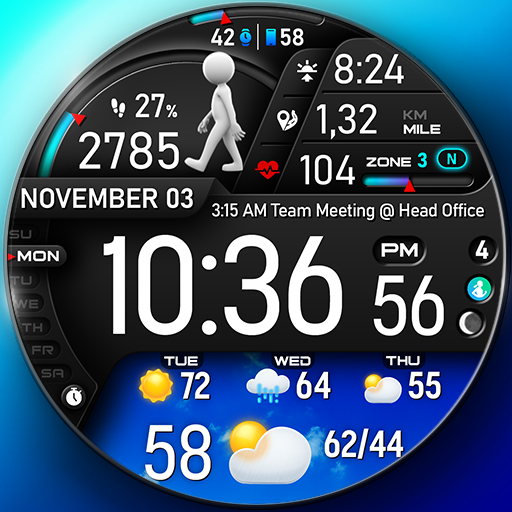
🚀PER23 Digital Watch Face is an advanced digital watch face designed for Wear OS smartwatches. It offers changeable font styles, 3D realistic animated weather, stunning visuals, and forecast weather data.
🏃♂️ Step to See the Dancer!
We designed an interactive watch face to keep you motivated and moving. With every step, watch the runner animation change as you progress toward your goal. Hit 100% of your step goal to see the ultimate dancer animation and celebrate your success!
🎥 Check out the animations in action: https://www.youtube.com/watch?v=MYEzKs-xxAA
🎨 Endless Customization
10 font styles for time
10 backgrounds
10 bar colors
6 sky animations
25 color combinations
6 custom complications
10 AOD Dims
🔹 Key Features of PER23 Digital Watch Face Digital
Weather type and temperature (°F / °C)
High & Low temperature (°F / °C)
Next 3 days' weather type
Next 3 days' temperature (°F / °C)
Steps, daily goal & distance (KM / Miles)
Phone & watch battery level
Active burned calories, floors
Heart rate monitor
UV index, rain possibility
Moon phase, sunset/sunrise
Time zone, barometer
Next appointment reminder
Always-On display with adjustable colors
🛠️ Easy Customization Mode
Simply touch and hold to personalize what data you see — weather, sunrise/sunset, time zone, and more.
🔋 For extra complications and widgets like phone battery, calories, or floors, please check the setup guide here:
👉 https://persona-wf.com/installation/
❓ Weather Not Updating?
Seeing a “❓” icon? That means your watch can’t get weather data. Check your internet connection and refresh the watch face.
🌙 Always-On Display (AOD)
The watch face has an always-active display. You can change the brightness level in the customization menu. There are 10 levels in total.
The colors are synchronized with the normal view.
With the new option “AOD Dim” in the customization menu, you can now change the AOD layout.
🌐 More Details:
https://persona-wf.com/portfolios/platinum/
📖 Installation Guide
Before leaving a review, make sure to check the installation guide and FAQ for a smooth experience:
👉 https://persona-wf.com/installation/
⌚ Supported Devices
Compatible with all Wear OS devices (API Level 34+), including:
SAMSUNG: Galaxy Watch8 Classic, Galaxy Watch Ultra, Watch8, 7, 6, 5, 4
GOOGLE: Pixel Watch 1, 2, 3, 4
FOSSIL: Gen 7, Gen 6, Gen 5e series
MOBVOI: TicWatch Pro 5, Pro 3, E3, C2
🚀 Exceptional Support
Need assistance? We’re here for you
📩 support@persona-wf.com
💜 Join Our Community
Get the latest designs & exclusive offers
🌐 https://persona-wf.com
📩 Newsletter
https://persona-wf.com/register
👍 Facebook
https://www.facebook.com/Persona-Watch-Face
📸 Instagram
https://www.instagram.com/persona_watch_face
💬 Telegram
https://t.me/persona_watchface
▶️ YouTube
https://www.youtube.com/c/PersonaWatchFace
💖💖💖 Thank You for Choosing PERSONA!
We hope our design brightens your day and your wrist 😊
Designed with love by Ayla GOKMEN PER23 Digital Watch Face , a leading app in the Personalization Apps category, boasts a robust user base with a total of 19M installs. It sees impressive engagement 24K daily installs, reflecting its popularity and usability. The app generates significant monthly revenue, indicative of its effective monetization strategies and user satisfaction. The app supports in-app purchases, allowing users to enhance their experience with additional features and content. PER23 Digital Watch Face was first released January 26, 2024, and has been continually updated, with the latest update rolled out just March 18, 2026. This commitment to regular updates ensures that users always have access to the latest features and improvements. The app and is currently on version watch9. With 78 reviews, PER23 Digital Watch Face maintains a strong presence in the market, supported by numerous rating votes that attest to its reliability and effectiveness in helping users achieve their Top charts paid play goals.
🏃♂️ Step to See the Dancer!
We designed an interactive watch face to keep you motivated and moving. With every step, watch the runner animation change as you progress toward your goal. Hit 100% of your step goal to see the ultimate dancer animation and celebrate your success!
🎥 Check out the animations in action: https://www.youtube.com/watch?v=MYEzKs-xxAA
🎨 Endless Customization
10 font styles for time
10 backgrounds
10 bar colors
6 sky animations
25 color combinations
6 custom complications
10 AOD Dims
🔹 Key Features of PER23 Digital Watch Face Digital
Weather type and temperature (°F / °C)
High & Low temperature (°F / °C)
Next 3 days' weather type
Next 3 days' temperature (°F / °C)
Steps, daily goal & distance (KM / Miles)
Phone & watch battery level
Active burned calories, floors
Heart rate monitor
UV index, rain possibility
Moon phase, sunset/sunrise
Time zone, barometer
Next appointment reminder
Always-On display with adjustable colors
🛠️ Easy Customization Mode
Simply touch and hold to personalize what data you see — weather, sunrise/sunset, time zone, and more.
🔋 For extra complications and widgets like phone battery, calories, or floors, please check the setup guide here:
👉 https://persona-wf.com/installation/
❓ Weather Not Updating?
Seeing a “❓” icon? That means your watch can’t get weather data. Check your internet connection and refresh the watch face.
🌙 Always-On Display (AOD)
The watch face has an always-active display. You can change the brightness level in the customization menu. There are 10 levels in total.
The colors are synchronized with the normal view.
With the new option “AOD Dim” in the customization menu, you can now change the AOD layout.
🌐 More Details:
https://persona-wf.com/portfolios/platinum/
📖 Installation Guide
Before leaving a review, make sure to check the installation guide and FAQ for a smooth experience:
👉 https://persona-wf.com/installation/
⌚ Supported Devices
Compatible with all Wear OS devices (API Level 34+), including:
SAMSUNG: Galaxy Watch8 Classic, Galaxy Watch Ultra, Watch8, 7, 6, 5, 4
GOOGLE: Pixel Watch 1, 2, 3, 4
FOSSIL: Gen 7, Gen 6, Gen 5e series
MOBVOI: TicWatch Pro 5, Pro 3, E3, C2
🚀 Exceptional Support
Need assistance? We’re here for you
📩 support@persona-wf.com
💜 Join Our Community
Get the latest designs & exclusive offers
🌐 https://persona-wf.com
📩 Newsletter
https://persona-wf.com/register
https://www.facebook.com/Persona-Watch-Face
https://www.instagram.com/persona_watch_face
💬 Telegram
https://t.me/persona_watchface
▶️ YouTube
https://www.youtube.com/c/PersonaWatchFace
💖💖💖 Thank You for Choosing PERSONA!
We hope our design brightens your day and your wrist 😊
Designed with love by Ayla GOKMEN PER23 Digital Watch Face , a leading app in the Personalization Apps category, boasts a robust user base with a total of 19M installs. It sees impressive engagement 24K daily installs, reflecting its popularity and usability. The app generates significant monthly revenue, indicative of its effective monetization strategies and user satisfaction. The app supports in-app purchases, allowing users to enhance their experience with additional features and content. PER23 Digital Watch Face was first released January 26, 2024, and has been continually updated, with the latest update rolled out just March 18, 2026. This commitment to regular updates ensures that users always have access to the latest features and improvements. The app and is currently on version watch9. With 78 reviews, PER23 Digital Watch Face maintains a strong presence in the market, supported by numerous rating votes that attest to its reliability and effectiveness in helping users achieve their Top charts paid play goals.
Fallout Pip-Boy SE Watch Face
Fallout Pip-Boy SE Watch Face
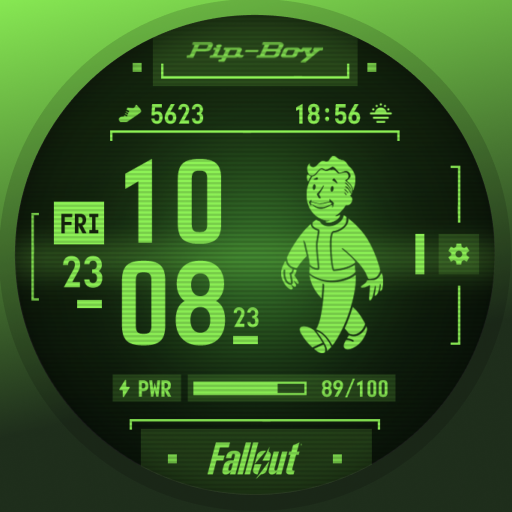
Get ready to conquer the wasteland with the new Pip-Boy Special Edition watch face that’s battery-optimized for Wear OS!
Compatible with Galaxy Watch7, Ultra, and Pixel Watch 3.
Explore 500,000+ Free & Premium Faces on Facer: https://bit.ly/FacerGooglePlay
FEATURES of Pip-Boy SE:
1- 12/24H Digital Clock
2- Date
3- Battery level
4- Animated Vault Boy based on heart rate:
- Appears first for several seconds on the watch when the screen is activated
- Appears between 0-100 bpm
- Appears between 101-150bpm
- Appears between 151-240bpm
5- Three frame styles
6- Four color options
7- Two customizable wear OS complications
- Step counter (By default)
- Sunrise/Sunset (By default)
FEEDBACK & TROUBLESHOOTING
If you’re having any issues using our app & watch faces or are dissatisfied in any way, please give us a chance to fix it for you before expressing dissatisfaction through ratings.
You can send feedback directly to support@facer.io
If you are enjoying our watch faces, we always appreciate a positive review. Fallout Pip-Boy SE Watch Face , a leading app in the Personalization Apps category, boasts a robust user base with a total of 163M installs. It sees impressive engagement with 10M monthly installs and 225K daily installs, reflecting its popularity and usability. The app generates significant monthly revenue, indicative of its effective monetization strategies and user satisfaction. The app supports in-app purchases, allowing users to enhance their experience with additional features and content. Fallout Pip-Boy SE Watch Face was first released April 05, 2024, and has been continually updated, with the latest update rolled out just August 09, 2025. This commitment to regular updates ensures that users always have access to the latest features and improvements. The app and is currently on version 7.0.34_258. With 337 reviews, Fallout Pip-Boy SE Watch Face maintains a strong presence in the market, supported by numerous rating votes that attest to its reliability and effectiveness in helping users achieve their Top charts paid play goals.
Compatible with Galaxy Watch7, Ultra, and Pixel Watch 3.
Explore 500,000+ Free & Premium Faces on Facer: https://bit.ly/FacerGooglePlay
FEATURES of Pip-Boy SE:
1- 12/24H Digital Clock
2- Date
3- Battery level
4- Animated Vault Boy based on heart rate:
- Appears first for several seconds on the watch when the screen is activated
- Appears between 0-100 bpm
- Appears between 101-150bpm
- Appears between 151-240bpm
5- Three frame styles
6- Four color options
7- Two customizable wear OS complications
- Step counter (By default)
- Sunrise/Sunset (By default)
FEEDBACK & TROUBLESHOOTING
If you’re having any issues using our app & watch faces or are dissatisfied in any way, please give us a chance to fix it for you before expressing dissatisfaction through ratings.
You can send feedback directly to support@facer.io
If you are enjoying our watch faces, we always appreciate a positive review. Fallout Pip-Boy SE Watch Face , a leading app in the Personalization Apps category, boasts a robust user base with a total of 163M installs. It sees impressive engagement with 10M monthly installs and 225K daily installs, reflecting its popularity and usability. The app generates significant monthly revenue, indicative of its effective monetization strategies and user satisfaction. The app supports in-app purchases, allowing users to enhance their experience with additional features and content. Fallout Pip-Boy SE Watch Face was first released April 05, 2024, and has been continually updated, with the latest update rolled out just August 09, 2025. This commitment to regular updates ensures that users always have access to the latest features and improvements. The app and is currently on version 7.0.34_258. With 337 reviews, Fallout Pip-Boy SE Watch Face maintains a strong presence in the market, supported by numerous rating votes that attest to its reliability and effectiveness in helping users achieve their Top charts paid play goals.

MD339 Digital watch face
MD339 Digital watch face
New watch face format.
This advanced watch face adheres to the latest watch face format required by Google Play.
Note: If you own an older Galaxy Watch 4 or 5, you may experience customization issues due to less recent hardware.
We do not recommend downloading this watch face on these models.
If you have already installed it and encounter problems, please contact us at support@mdwatchfaces.com
Key Features:
- 6 Preset App Shortcuts and 1 Customizable Shortcut.
- 3 Customizable Complications: Display your preferred data such as barometer, distance walked, calories, UV index, chance of rain, and more.
-Current weather conditions with the option to display hourly or daily forecasts
Device Compatibility:
This watch face uses advanced weather features, allowing you to choose between daily or hourly forecasts based on your preference.
It support all Wear OS devices with API Level 34+ (Wear OS 5 and later versions) like Samsung Galaxy Watch 4-8, Ultra, Pixel Watch etc.
Features at a Glance:
- 12/24hr Format: Syncs with your phone settings.
- Digital watch face
- Date
- Day
- Year
- Heart Rate Monitoring + Intervals
- Steps + Daily Goals
- Battery meter
- 6 Preset App Shortcuts:
- Calendar
- Battery
- Measure Heart Rate
- Set Alarm
- Steps
- Weather*
- 1 Customizable Shortcut
- 3 Customizable Complications
- Full customization: independently change time/date colors, complication fonts, battery indicator color, heart rate LCD color, plus light/dark theme
- Always On Display Mode: Minimal and full modes available.
Customization:
1. Touch and hold the screen on your watch.
2. Tap on the 'customize' option to personalize your watch face.
Weather & Forecasts:
This watch face uses your watch’s built-in weather provider — no internal weather app is included.
Weather data may occasionally be unavailable due to provider limitations.
You can choose between:
Daily forecasts (next 2 days)
Hourly forecasts (+6h / +12h)
These options can be set from the customization menu.
The temperature is displayed in either Celsius or Fahrenheit, depending on your phone settings.
Daily weather forecasts may not show data between 00:00 and 07:00 due to a bug in the weather provider. This issue cannot be fixed on our side but has already been reported to Samsung and Google.
During this time, you can switch to hourly forecasts instead.
*On Galaxy Watches, the weather shortcut links to Samsung’s default Weather app. On other devices (e.g., Pixel Watch), this shortcut may not be available, but forecasts will still display on the watch face without limitations.
Watch Face Complications:
Customize up to 3 complications with data such health metrics (calories, distance walked), world clock, barometer, and more.
To obtain data from "complications" such as distance, bitcoin and more, it will be necessary to install additional complications if they are not already available on your watch.
Note: Complications are external apps, and we have no control over them.
Support:
For support or to learn how to install additional complications, contact us at: support@mdwatchfaces.com
Some features may not be available on all watches.
Stay Connected:
Newsletter:
Sign up to stay updated with new watchfaces and promotions.
http://eepurl.com/hlRcvf
FACEBOOK:
https://www.facebook.com/matteodiniwatchfaces
INSTAGRAM:
https://www.instagram.com/mdwatchfaces/
TELEGRAM:
https://t.me/mdwatchfaces
WEB:
https://www.matteodinimd.com
Thank you! MD339 Digital watch face , a leading app in the Personalization Apps category, boasts a robust user base with a total of 3M installs. It sees impressive engagement 15K daily installs, reflecting its popularity and usability. The app generates significant monthly revenue, indicative of its effective monetization strategies and user satisfaction. The app supports in-app purchases, allowing users to enhance their experience with additional features and content. MD339 Digital watch face was first released August 20, 2025, and has been continually updated, with the latest update rolled out just August 24, 2025. This commitment to regular updates ensures that users always have access to the latest features and improvements. The app and is currently on version 1.010. With 26 reviews, MD339 Digital watch face maintains a strong presence in the market, supported by numerous rating votes that attest to its reliability and effectiveness in helping users achieve their Top charts paid play goals.
This advanced watch face adheres to the latest watch face format required by Google Play.
Note: If you own an older Galaxy Watch 4 or 5, you may experience customization issues due to less recent hardware.
We do not recommend downloading this watch face on these models.
If you have already installed it and encounter problems, please contact us at support@mdwatchfaces.com
Key Features:
- 6 Preset App Shortcuts and 1 Customizable Shortcut.
- 3 Customizable Complications: Display your preferred data such as barometer, distance walked, calories, UV index, chance of rain, and more.
-Current weather conditions with the option to display hourly or daily forecasts
Device Compatibility:
This watch face uses advanced weather features, allowing you to choose between daily or hourly forecasts based on your preference.
It support all Wear OS devices with API Level 34+ (Wear OS 5 and later versions) like Samsung Galaxy Watch 4-8, Ultra, Pixel Watch etc.
Features at a Glance:
- 12/24hr Format: Syncs with your phone settings.
- Digital watch face
- Date
- Day
- Year
- Heart Rate Monitoring + Intervals
- Steps + Daily Goals
- Battery meter
- 6 Preset App Shortcuts:
- Calendar
- Battery
- Measure Heart Rate
- Set Alarm
- Steps
- Weather*
- 1 Customizable Shortcut
- 3 Customizable Complications
- Full customization: independently change time/date colors, complication fonts, battery indicator color, heart rate LCD color, plus light/dark theme
- Always On Display Mode: Minimal and full modes available.
Customization:
1. Touch and hold the screen on your watch.
2. Tap on the 'customize' option to personalize your watch face.
Weather & Forecasts:
This watch face uses your watch’s built-in weather provider — no internal weather app is included.
Weather data may occasionally be unavailable due to provider limitations.
You can choose between:
Daily forecasts (next 2 days)
Hourly forecasts (+6h / +12h)
These options can be set from the customization menu.
The temperature is displayed in either Celsius or Fahrenheit, depending on your phone settings.
Daily weather forecasts may not show data between 00:00 and 07:00 due to a bug in the weather provider. This issue cannot be fixed on our side but has already been reported to Samsung and Google.
During this time, you can switch to hourly forecasts instead.
*On Galaxy Watches, the weather shortcut links to Samsung’s default Weather app. On other devices (e.g., Pixel Watch), this shortcut may not be available, but forecasts will still display on the watch face without limitations.
Watch Face Complications:
Customize up to 3 complications with data such health metrics (calories, distance walked), world clock, barometer, and more.
To obtain data from "complications" such as distance, bitcoin and more, it will be necessary to install additional complications if they are not already available on your watch.
Note: Complications are external apps, and we have no control over them.
Support:
For support or to learn how to install additional complications, contact us at: support@mdwatchfaces.com
Some features may not be available on all watches.
Stay Connected:
Newsletter:
Sign up to stay updated with new watchfaces and promotions.
http://eepurl.com/hlRcvf
FACEBOOK:
https://www.facebook.com/matteodiniwatchfaces
INSTAGRAM:
https://www.instagram.com/mdwatchfaces/
TELEGRAM:
https://t.me/mdwatchfaces
WEB:
https://www.matteodinimd.com
Thank you! MD339 Digital watch face , a leading app in the Personalization Apps category, boasts a robust user base with a total of 3M installs. It sees impressive engagement 15K daily installs, reflecting its popularity and usability. The app generates significant monthly revenue, indicative of its effective monetization strategies and user satisfaction. The app supports in-app purchases, allowing users to enhance their experience with additional features and content. MD339 Digital watch face was first released August 20, 2025, and has been continually updated, with the latest update rolled out just August 24, 2025. This commitment to regular updates ensures that users always have access to the latest features and improvements. The app and is currently on version 1.010. With 26 reviews, MD339 Digital watch face maintains a strong presence in the market, supported by numerous rating votes that attest to its reliability and effectiveness in helping users achieve their Top charts paid play goals.

S4U Assen - Hybrid watch face
S4U Assen - Hybrid watch face
Enhance your Wear OS experience with the S4U Assen. A realistic analog watch face with an additional LCD screen to display some useful information. You can customize the colors, hands and have the option to set additional complications.
✨ Key Features:
- Realistic hybrid dial (digital and analog design elements combined).
- Color customization (13 LCD colors and 10 index colors).
- 4 custom complications (for user-defined data).
- 3 custom shortcuts to access your favorite widget
- 4 custom clock hands
- 2 custom small hands
- 3 AOD brightness levels
- Watch face displays time, steps, heart rate, day of the week, day of the month, number of unread messages + 2 custom complications
****
⚠️ IMPORTANT: Compatibility & Installation
This app is optimized for the new Watch Face Format regarding Wear OS 5 (API 34+). Compatible devices include:
- Samsung Galaxy Watch 8, Ultra, 7, 6 , 5, 4 (Wear OS 5 update required)
- Google Pixel Watch Series
- Other Wear OS 5+ smartwatches
(Note: Only devices running Wear OS 5 or higher are supported!)
If you experience any issues with installation or downloading:
1. Ensure your watch is updated to the latest Wear OS version.
2. Open the companion app provided with your purchase.
3. Follow the steps in the Install/Issues section.
Still need help? Email me at wear@s4u-watches.com.
****
🌙 Always-On Display (AOD)
The dial has an always active display. You can change the brightness level in the customization menu. There are 3 levels in total.
The colors are synchronized with the normal view.
With the new option “AOD Layout” in the customization menu, you can now change the AOD to a minimal layout.
Important Notes:
- Using AOD will reduce battery life, depending on your smartwatch's settings.
- Some smartwatches may automatically dim the AOD display based on ambient light conditions.
****
🎨 CUSTOMIZATION OPTIONS
1. Press and hold your finger at center on the watch display.
2. Press the button to adjust.
3. Swipe left or right to switch between the different customizable items.
4. Swipe up or down to change the options/color of the items.
Available Customization Options:
Color: 30 themes - 13 colors (LCD display and hand color)
Index colors: 10
Ring colors: 10
Hands: 4 styles
Small hands: 2 styles
LCD Layout: Digital Time or Date
AOD brightness: 3 level
Complications: 4 custom complications, 3 shortcuts
Additional functionality:
+ tap the battery indicator to open battery details
(not supported by every smartwatch)
****
⚙️ COMPLICATIONS & SHORTCUTS
Enhance your watch face with customizable app shortcuts and complications:
- App Shortcuts: Link to your favorite widgets for quick access.
- Editable Complications: Display the data you need most by customizing the visible values.
1. Press and hold the watch display.
2. Push the customize button.
3. Swipe from right to left until you reach the "complications".
4. 3 app shortcuts and 4 custom complications are highlighted. Click on them to make the desired settings.
****
📬 Stay Connected
If you enjoy this design, be sure to check out my other creations! I’m constantly working on new watch faces for Wear OS. Visit my website to explore more:
🌐 https://www.s4u-watches.com
Feedback & Support
I’d love to hear your thoughts! Whether it’s something you like, dislike, or a suggestion for future designs, your feedback helps me improve.
📧 For direct support, email me at: wear@s4u-watches.com
💬 Leave a review on the Play Store to share your experience!
Follow Me on Social Media
Stay up to date with my latest designs and updates:
📸 Instagram: https://www.instagram.com/matze_styles4you/
👍 Facebook: https://www.facebook.com/styles4you
▶️ YouTube: https://www.youtube.com/c/styles4you-watches
🐦 X: https://x.com/MStyles4you S4U Assen - Hybrid watch face , a leading app in the Personalization Apps category, boasts a robust user base with a total of 140M installs. It sees impressive engagement 145K daily installs, reflecting its popularity and usability. The app generates significant monthly revenue, indicative of its effective monetization strategies and user satisfaction. The app supports in-app purchases, allowing users to enhance their experience with additional features and content. S4U Assen - Hybrid watch face was first released August 10, 2023, and has been continually updated, with the latest update rolled out just March 12, 2026. This commitment to regular updates ensures that users always have access to the latest features and improvements. The app and is currently on version 1.0.9. With 88 reviews, S4U Assen - Hybrid watch face maintains a strong presence in the market, supported by numerous rating votes that attest to its reliability and effectiveness in helping users achieve their Top charts paid play goals.
✨ Key Features:
- Realistic hybrid dial (digital and analog design elements combined).
- Color customization (13 LCD colors and 10 index colors).
- 4 custom complications (for user-defined data).
- 3 custom shortcuts to access your favorite widget
- 4 custom clock hands
- 2 custom small hands
- 3 AOD brightness levels
- Watch face displays time, steps, heart rate, day of the week, day of the month, number of unread messages + 2 custom complications
****
⚠️ IMPORTANT: Compatibility & Installation
This app is optimized for the new Watch Face Format regarding Wear OS 5 (API 34+). Compatible devices include:
- Samsung Galaxy Watch 8, Ultra, 7, 6 , 5, 4 (Wear OS 5 update required)
- Google Pixel Watch Series
- Other Wear OS 5+ smartwatches
(Note: Only devices running Wear OS 5 or higher are supported!)
If you experience any issues with installation or downloading:
1. Ensure your watch is updated to the latest Wear OS version.
2. Open the companion app provided with your purchase.
3. Follow the steps in the Install/Issues section.
Still need help? Email me at wear@s4u-watches.com.
****
🌙 Always-On Display (AOD)
The dial has an always active display. You can change the brightness level in the customization menu. There are 3 levels in total.
The colors are synchronized with the normal view.
With the new option “AOD Layout” in the customization menu, you can now change the AOD to a minimal layout.
Important Notes:
- Using AOD will reduce battery life, depending on your smartwatch's settings.
- Some smartwatches may automatically dim the AOD display based on ambient light conditions.
****
🎨 CUSTOMIZATION OPTIONS
1. Press and hold your finger at center on the watch display.
2. Press the button to adjust.
3. Swipe left or right to switch between the different customizable items.
4. Swipe up or down to change the options/color of the items.
Available Customization Options:
Color: 30 themes - 13 colors (LCD display and hand color)
Index colors: 10
Ring colors: 10
Hands: 4 styles
Small hands: 2 styles
LCD Layout: Digital Time or Date
AOD brightness: 3 level
Complications: 4 custom complications, 3 shortcuts
Additional functionality:
+ tap the battery indicator to open battery details
(not supported by every smartwatch)
****
⚙️ COMPLICATIONS & SHORTCUTS
Enhance your watch face with customizable app shortcuts and complications:
- App Shortcuts: Link to your favorite widgets for quick access.
- Editable Complications: Display the data you need most by customizing the visible values.
1. Press and hold the watch display.
2. Push the customize button.
3. Swipe from right to left until you reach the "complications".
4. 3 app shortcuts and 4 custom complications are highlighted. Click on them to make the desired settings.
****
📬 Stay Connected
If you enjoy this design, be sure to check out my other creations! I’m constantly working on new watch faces for Wear OS. Visit my website to explore more:
🌐 https://www.s4u-watches.com
Feedback & Support
I’d love to hear your thoughts! Whether it’s something you like, dislike, or a suggestion for future designs, your feedback helps me improve.
📧 For direct support, email me at: wear@s4u-watches.com
💬 Leave a review on the Play Store to share your experience!
Follow Me on Social Media
Stay up to date with my latest designs and updates:
📸 Instagram: https://www.instagram.com/matze_styles4you/
👍 Facebook: https://www.facebook.com/styles4you
▶️ YouTube: https://www.youtube.com/c/styles4you-watches
🐦 X: https://x.com/MStyles4you S4U Assen - Hybrid watch face , a leading app in the Personalization Apps category, boasts a robust user base with a total of 140M installs. It sees impressive engagement 145K daily installs, reflecting its popularity and usability. The app generates significant monthly revenue, indicative of its effective monetization strategies and user satisfaction. The app supports in-app purchases, allowing users to enhance their experience with additional features and content. S4U Assen - Hybrid watch face was first released August 10, 2023, and has been continually updated, with the latest update rolled out just March 12, 2026. This commitment to regular updates ensures that users always have access to the latest features and improvements. The app and is currently on version 1.0.9. With 88 reviews, S4U Assen - Hybrid watch face maintains a strong presence in the market, supported by numerous rating votes that attest to its reliability and effectiveness in helping users achieve their Top charts paid play goals.

Hybrid TAG Carrera Watch face
Hybrid TAG Carrera Watch face
This watch face is for Wear OS devices only.
Watch face information:
To change the look of the watch face, use the settings
• Change color. Use the watch face settings to change the color
• The dial supports 12h/24h automatic time format switching
• Date display
• Display analog time
• Display digital time
• Battery charge display
• Display of steps taken
• Display Kalories
• Heart rate Hybrid TAG Carrera Watch face , a leading app in the Personalization Apps category, boasts a robust user base with a total of 43M installs. It sees impressive engagement 73K daily installs, reflecting its popularity and usability. The app generates significant monthly revenue, indicative of its effective monetization strategies and user satisfaction. The app supports in-app purchases, allowing users to enhance their experience with additional features and content. Hybrid TAG Carrera Watch face was first released August 11, 2024, and has been continually updated, with the latest update rolled out just November 12, 2024. This commitment to regular updates ensures that users always have access to the latest features and improvements. With 20 reviews, Hybrid TAG Carrera Watch face maintains a strong presence in the market, supported by numerous rating votes that attest to its reliability and effectiveness in helping users achieve their Top charts paid play goals.
Watch face information:
To change the look of the watch face, use the settings
• Change color. Use the watch face settings to change the color
• The dial supports 12h/24h automatic time format switching
• Date display
• Display analog time
• Display digital time
• Battery charge display
• Display of steps taken
• Display Kalories
• Heart rate Hybrid TAG Carrera Watch face , a leading app in the Personalization Apps category, boasts a robust user base with a total of 43M installs. It sees impressive engagement 73K daily installs, reflecting its popularity and usability. The app generates significant monthly revenue, indicative of its effective monetization strategies and user satisfaction. The app supports in-app purchases, allowing users to enhance their experience with additional features and content. Hybrid TAG Carrera Watch face was first released August 11, 2024, and has been continually updated, with the latest update rolled out just November 12, 2024. This commitment to regular updates ensures that users always have access to the latest features and improvements. With 20 reviews, Hybrid TAG Carrera Watch face maintains a strong presence in the market, supported by numerous rating votes that attest to its reliability and effectiveness in helping users achieve their Top charts paid play goals.