❯
- ❯Market Explorer
- ❯Collections
- ❯Chrome Extension
- ❯API
- ❯App timeline
- ❯Blog
- ❯Partners
Top Paid Auto & Vehicles Apps in Germany
Top 10 Apps

Restaurator
Restaurator
Restaurator – Dein digitaler Werkstatt-, Tuning- & Fahrzeugmanager
Ob Oldtimer, Youngtimer, Custom-Bike oder Tuning-Projekt – Restaurator 4.0 ist dein smarter Begleiter für alle, die ihre Fahrzeuge lieben, pflegen, optimieren und perfekt organisiert verwalten möchten.
Von der ersten Schraube bis zum fertigen Projekt – alles sicher an einem Ort, jederzeit griffbereit.
Funktionen im Überblick
• Projekte & Sammlungen verwalten
Erstelle digitale Fahrzeugakten mit Foto, Baujahr, Leistung, Hubraum & Fahrgestellnummer.
Verwalte deine gesamte Sammlung übersichtlich und professionell – egal ob Oldtimer, Vespa, Youngtimer oder dein aktuelles Tuning-Projekt.
• Fotodokumentation Ausbau / Einbau / Tuning-Umbau
Halte jeden Arbeitsschritt fest – vom Ausbau bis zur finalen Optimierung.
Perfekt für Motor-, Fahrwerks- oder Optik-Tuning: Dokumentiere jeden Umbau mit Fotos und Statusanzeige.
Farbige Fortschrittsanzeigen zeigen dir jederzeit, wie weit dein Projekt ist.
• Teileverwaltung & Tags
Organisiere Ersatzteile, Zubehör, Tuning-Komponenten und Schrauben mit Fotos, Codes, Notizen & Status.
Defekte oder getauschte Teile werden automatisch erkannt und auf die Einkaufsliste gesetzt.
• Bildbasierte Teilesuche (KI)
Einfach Foto aufnehmen – die App erkennt das Teil automatisch und schlägt passende Alternativen oder ähnliche Komponenten vor.
Ideal auch für Tuning-Teile und seltene Custom-Bauteile.
• Rechnungen & Kostenkontrolle
Lade Belege als PDF oder Foto hoch – Beträge, Lieferanten und Datum werden automatisch erkannt.
Behalte alle Kosten im Blick und analysiere deine Ausgaben pro Projekt oder Fahrzeug.
• Arbeitsstunden erfassen
Dokumentiere deine Arbeitszeit oder die deiner Helfer.
Automatische Tages- und Projektsummen machen Nachverfolgung kinderleicht – perfekt auch für Werkstätten und Tuning-Teams.
• Fahrzeugdokumente & Anleitungen
Alle Papiere, TÜV-Berichte, ABE, Handbücher und Zeichnungen digital & sicher an einem Ort gespeichert.
Tuning-Eintragungen oder Prüfberichte immer griffbereit.
• Ersatzteilbestand & Wartungskalender
Verwalte dein Lager, plane Ölwechsel, TÜV-Termine und Wartungen.
Automatische Erinnerungen halten dich immer auf dem Laufenden.
• Oldtimerbewertung & Marktanalyse
Erhalte realistische Fahrzeugbewertungen basierend auf Zustand, Marktwert und Referenzmodellen – ideal für Versicherungen, Sammler oder getunte Fahrzeuge.
• Projekt-Report (PDF)
Mit nur einem Klick erstellst du eine vollständige Projektdokumentation – perfekt für Wertgutachten, Verkauf oder Versicherung.
• Backup Funktion
NEU: RestauratorShop & Exklusive Partner
• RestauratorShop
Direkt in der App erreichbar: Barcode-Etiketten, Beschriftungstüten und Werkstattzubehör – perfekt abgestimmt auf deine Restaurator- und Tuning-Projekte.
So bleibt jedes Teil organisiert und beschriftet – Chaos in der Werkstatt gehört der Vergangenheit an.
• Exklusive Ersatzteil- und Tuning-Partner
Profitiere von exklusiven Partnerschaften mit führenden Ersatzteil- und Tuning-Shops – z. B. OSTOASE, dem offiziellen Simson-Partner in der Restaurator-App.
Passende Teile, Dokumente und Händler sind direkt in der App verknüpft.
Warum Restaurator 4.0?
• Alles an einem Ort: Projekte, Teile, Fotos, Rechnungen, Stunden, Bewertungen & Wartungen
• Für alle Fahrzeugliebhaber: Ob Schrauber, Sammler, Tuner oder Alltagsfahrer – jeder behält den Überblick
• Smarte Suche: Finde alles schnell per Code, Name, Tag oder Foto
• Von Schraubern entwickelt: Aus echter Restaurations- und Tuning-Praxis – mit Fokus auf Einfachheit und Effizienz
Mit Restaurator 4.0 hast du deine komplette Werkstatt, Sammlung, Tuning-Projekte und Fahrzeugverwaltung in der Tasche –
übersichtlich, sicher und praxisnah.
Weniger Zettelwirtschaft. Mehr Kontrolle. Mehr Leidenschaft fürs Fahrzeug. Restaurator , a leading app in the Auto & Vehicles Apps category, boasts a robust user base with a total of 286K installs. It sees impressive engagement 4K daily installs, reflecting its popularity and usability. The app generates significant monthly revenue, indicative of its effective monetization strategies and user satisfaction. The app supports in-app purchases, allowing users to enhance their experience with additional features and content. Restaurator was first released November 29, 2025, and has been continually updated, with the latest update rolled out just January 26, 2026. This commitment to regular updates ensures that users always have access to the latest features and improvements. The app and is currently on version 4.4.0. Restaurator maintains a strong presence in the market, supported by numerous rating votes that attest to its reliability and effectiveness in helping users achieve their Top charts paid play goals.
Ob Oldtimer, Youngtimer, Custom-Bike oder Tuning-Projekt – Restaurator 4.0 ist dein smarter Begleiter für alle, die ihre Fahrzeuge lieben, pflegen, optimieren und perfekt organisiert verwalten möchten.
Von der ersten Schraube bis zum fertigen Projekt – alles sicher an einem Ort, jederzeit griffbereit.
Funktionen im Überblick
• Projekte & Sammlungen verwalten
Erstelle digitale Fahrzeugakten mit Foto, Baujahr, Leistung, Hubraum & Fahrgestellnummer.
Verwalte deine gesamte Sammlung übersichtlich und professionell – egal ob Oldtimer, Vespa, Youngtimer oder dein aktuelles Tuning-Projekt.
• Fotodokumentation Ausbau / Einbau / Tuning-Umbau
Halte jeden Arbeitsschritt fest – vom Ausbau bis zur finalen Optimierung.
Perfekt für Motor-, Fahrwerks- oder Optik-Tuning: Dokumentiere jeden Umbau mit Fotos und Statusanzeige.
Farbige Fortschrittsanzeigen zeigen dir jederzeit, wie weit dein Projekt ist.
• Teileverwaltung & Tags
Organisiere Ersatzteile, Zubehör, Tuning-Komponenten und Schrauben mit Fotos, Codes, Notizen & Status.
Defekte oder getauschte Teile werden automatisch erkannt und auf die Einkaufsliste gesetzt.
• Bildbasierte Teilesuche (KI)
Einfach Foto aufnehmen – die App erkennt das Teil automatisch und schlägt passende Alternativen oder ähnliche Komponenten vor.
Ideal auch für Tuning-Teile und seltene Custom-Bauteile.
• Rechnungen & Kostenkontrolle
Lade Belege als PDF oder Foto hoch – Beträge, Lieferanten und Datum werden automatisch erkannt.
Behalte alle Kosten im Blick und analysiere deine Ausgaben pro Projekt oder Fahrzeug.
• Arbeitsstunden erfassen
Dokumentiere deine Arbeitszeit oder die deiner Helfer.
Automatische Tages- und Projektsummen machen Nachverfolgung kinderleicht – perfekt auch für Werkstätten und Tuning-Teams.
• Fahrzeugdokumente & Anleitungen
Alle Papiere, TÜV-Berichte, ABE, Handbücher und Zeichnungen digital & sicher an einem Ort gespeichert.
Tuning-Eintragungen oder Prüfberichte immer griffbereit.
• Ersatzteilbestand & Wartungskalender
Verwalte dein Lager, plane Ölwechsel, TÜV-Termine und Wartungen.
Automatische Erinnerungen halten dich immer auf dem Laufenden.
• Oldtimerbewertung & Marktanalyse
Erhalte realistische Fahrzeugbewertungen basierend auf Zustand, Marktwert und Referenzmodellen – ideal für Versicherungen, Sammler oder getunte Fahrzeuge.
• Projekt-Report (PDF)
Mit nur einem Klick erstellst du eine vollständige Projektdokumentation – perfekt für Wertgutachten, Verkauf oder Versicherung.
• Backup Funktion
NEU: RestauratorShop & Exklusive Partner
• RestauratorShop
Direkt in der App erreichbar: Barcode-Etiketten, Beschriftungstüten und Werkstattzubehör – perfekt abgestimmt auf deine Restaurator- und Tuning-Projekte.
So bleibt jedes Teil organisiert und beschriftet – Chaos in der Werkstatt gehört der Vergangenheit an.
• Exklusive Ersatzteil- und Tuning-Partner
Profitiere von exklusiven Partnerschaften mit führenden Ersatzteil- und Tuning-Shops – z. B. OSTOASE, dem offiziellen Simson-Partner in der Restaurator-App.
Passende Teile, Dokumente und Händler sind direkt in der App verknüpft.
Warum Restaurator 4.0?
• Alles an einem Ort: Projekte, Teile, Fotos, Rechnungen, Stunden, Bewertungen & Wartungen
• Für alle Fahrzeugliebhaber: Ob Schrauber, Sammler, Tuner oder Alltagsfahrer – jeder behält den Überblick
• Smarte Suche: Finde alles schnell per Code, Name, Tag oder Foto
• Von Schraubern entwickelt: Aus echter Restaurations- und Tuning-Praxis – mit Fokus auf Einfachheit und Effizienz
Mit Restaurator 4.0 hast du deine komplette Werkstatt, Sammlung, Tuning-Projekte und Fahrzeugverwaltung in der Tasche –
übersichtlich, sicher und praxisnah.
Weniger Zettelwirtschaft. Mehr Kontrolle. Mehr Leidenschaft fürs Fahrzeug. Restaurator , a leading app in the Auto & Vehicles Apps category, boasts a robust user base with a total of 286K installs. It sees impressive engagement 4K daily installs, reflecting its popularity and usability. The app generates significant monthly revenue, indicative of its effective monetization strategies and user satisfaction. The app supports in-app purchases, allowing users to enhance their experience with additional features and content. Restaurator was first released November 29, 2025, and has been continually updated, with the latest update rolled out just January 26, 2026. This commitment to regular updates ensures that users always have access to the latest features and improvements. The app and is currently on version 4.4.0. Restaurator maintains a strong presence in the market, supported by numerous rating votes that attest to its reliability and effectiveness in helping users achieve their Top charts paid play goals.

HU Reminder
HU Reminder
Never miss an MOT appointment again! It is annoying when you have to pay a fine because of a missed MOT (main inspection) appointment.
Few people know what actually comes to them, if once the MOT was forgotten.
Here you can see an overview of the fines:
-> https://www.hu-reminder.com/#penalty
The app HU Reminder can help you not to miss your MOT appointments anymore by sending you a reminder in time ( starts 30 days before the appointment). This reminder is sent daily at a time that can be adjusted, until you adjust the MOT date of the particular vehicle or trailer.
But you can also turn off the reminder and sporadically check if an appointment is due.
Functions:
- Reminder of appointments
- Set the time of a reminder
- set language ( currently only English and German )
- different types of vehicles ( car, motorcycle, trailer, truck, tractor, camper & caravan)
- upload a vehicle picture
- change the vehicle data
- sort the vehicles
- delete a vehicle
If you like the app HU Reminder feel free to rate it.
*** Thank you very much *** HU Reminder , a leading app in the Auto & Vehicles Apps category, boasts a robust user base with a total of 849K installs. It sees impressive engagement 9K daily installs, reflecting its popularity and usability. The app generates significant monthly revenue, indicative of its effective monetization strategies and user satisfaction. The app supports in-app purchases, allowing users to enhance their experience with additional features and content. HU Reminder was first released March 24, 2021, and has been continually updated, with the latest update rolled out just November 30, 2025. This commitment to regular updates ensures that users always have access to the latest features and improvements. The app and is currently on version 6.3.0. HU Reminder maintains a strong presence in the market, supported by numerous rating votes that attest to its reliability and effectiveness in helping users achieve their Top charts paid play goals.
Few people know what actually comes to them, if once the MOT was forgotten.
Here you can see an overview of the fines:
-> https://www.hu-reminder.com/#penalty
The app HU Reminder can help you not to miss your MOT appointments anymore by sending you a reminder in time ( starts 30 days before the appointment). This reminder is sent daily at a time that can be adjusted, until you adjust the MOT date of the particular vehicle or trailer.
But you can also turn off the reminder and sporadically check if an appointment is due.
Functions:
- Reminder of appointments
- Set the time of a reminder
- set language ( currently only English and German )
- different types of vehicles ( car, motorcycle, trailer, truck, tractor, camper & caravan)
- upload a vehicle picture
- change the vehicle data
- sort the vehicles
- delete a vehicle
If you like the app HU Reminder feel free to rate it.
*** Thank you very much *** HU Reminder , a leading app in the Auto & Vehicles Apps category, boasts a robust user base with a total of 849K installs. It sees impressive engagement 9K daily installs, reflecting its popularity and usability. The app generates significant monthly revenue, indicative of its effective monetization strategies and user satisfaction. The app supports in-app purchases, allowing users to enhance their experience with additional features and content. HU Reminder was first released March 24, 2021, and has been continually updated, with the latest update rolled out just November 30, 2025. This commitment to regular updates ensures that users always have access to the latest features and improvements. The app and is currently on version 6.3.0. HU Reminder maintains a strong presence in the market, supported by numerous rating votes that attest to its reliability and effectiveness in helping users achieve their Top charts paid play goals.

MoofMate
MoofMate
Experience the ultimate control over your VanMoof bike with MoofMate.
Take your biking experience to the next level with MoofMate's enhanced customizability. Personalize your ride by adjusting settings, uploading custom sounds, and tailoring features to your preferences.
Core Features:
• Easily connect and unlock your bike, see whether it’s locked, turned on, and it's battery level, along with other information.
• Change your speed limit.
• Boost++ increases your speed limit when pressing the boost button to make overtaking easier.
• Ride Recording: Track your bike rides effortlessly.
• Component Testing: Easily check and monitor bike components.
• Simple Connections: Connect and switch between bikes with ease.
• Live Dashboard: Access real-time data while riding.
• Maintenance system: Keep track of your bike's maintenance and log it.
• Custom notifications: Get notified when you left your bike without locking, maintenance notifications, battery notifications and more.
Model-Specific Features:
VanMoof SA5:
• Speed limits up to 32 km/h.
• Access sensor data like temperature sensors, pedal sensors and more.
• Monitor heartbeats to see if your parts are working or need maintenance.
• Disable bell sounds and lights completely.
• Customizable halo ring experience.
• Button combination to easily change settings.
• Manual shifting to take full control over your e-shifter to shift whenever you want.
VanMoof S3:
• Speed limits up to 37 km/h (below version 1.7.6 or with speed++ on any version).
• On-the-go settings adjustment via button combinations.
• Customize bike sounds, replace them with your favorite sounds.
• Custom gear shift moments.
• Detailed component status including temperature, battery, and more.
VanMoof X3:
• Speed limits up to 37 km/h (below version 1.7.6) and up to 32 km/h (version 1.7.6 and above).
• On-the-go settings adjustment via button combinations.
• Customize bike sounds, replace them with your favorite sounds.
• Custom gear shift moments.
• Detailed component status including temperature, battery, and more.
VanMoof SX2:
• Adjustable speed limits up to 37 km/h.
Diagnose and test your bike:
• Read all sensor data.
• Check component heartbeats.
• Keep track of maintenance.
• Detailed list of all errors.
• Enter repair mode from within MoofMate.
Seamless Syncing & Secure Storage:
MoofMate securely syncs and stores all your bikes' data directly on your device, keeping everything in one place
Take control of your VanMoof, download MoofMate now! MoofMate , a leading app in the Auto & Vehicles Apps category, boasts a robust user base with a total of 387K installs. It sees impressive engagement 1K daily installs, reflecting its popularity and usability. The app generates significant monthly revenue, indicative of its effective monetization strategies and user satisfaction. The app supports in-app purchases, allowing users to enhance their experience with additional features and content. MoofMate was first released August 08, 2025, and has been continually updated, with the latest update rolled out just January 19, 2026. This commitment to regular updates ensures that users always have access to the latest features and improvements. The app and is currently on version 3.17.4. MoofMate maintains a strong presence in the market, supported by numerous rating votes that attest to its reliability and effectiveness in helping users achieve their Top charts paid play goals.
Take your biking experience to the next level with MoofMate's enhanced customizability. Personalize your ride by adjusting settings, uploading custom sounds, and tailoring features to your preferences.
Core Features:
• Easily connect and unlock your bike, see whether it’s locked, turned on, and it's battery level, along with other information.
• Change your speed limit.
• Boost++ increases your speed limit when pressing the boost button to make overtaking easier.
• Ride Recording: Track your bike rides effortlessly.
• Component Testing: Easily check and monitor bike components.
• Simple Connections: Connect and switch between bikes with ease.
• Live Dashboard: Access real-time data while riding.
• Maintenance system: Keep track of your bike's maintenance and log it.
• Custom notifications: Get notified when you left your bike without locking, maintenance notifications, battery notifications and more.
Model-Specific Features:
VanMoof SA5:
• Speed limits up to 32 km/h.
• Access sensor data like temperature sensors, pedal sensors and more.
• Monitor heartbeats to see if your parts are working or need maintenance.
• Disable bell sounds and lights completely.
• Customizable halo ring experience.
• Button combination to easily change settings.
• Manual shifting to take full control over your e-shifter to shift whenever you want.
VanMoof S3:
• Speed limits up to 37 km/h (below version 1.7.6 or with speed++ on any version).
• On-the-go settings adjustment via button combinations.
• Customize bike sounds, replace them with your favorite sounds.
• Custom gear shift moments.
• Detailed component status including temperature, battery, and more.
VanMoof X3:
• Speed limits up to 37 km/h (below version 1.7.6) and up to 32 km/h (version 1.7.6 and above).
• On-the-go settings adjustment via button combinations.
• Customize bike sounds, replace them with your favorite sounds.
• Custom gear shift moments.
• Detailed component status including temperature, battery, and more.
VanMoof SX2:
• Adjustable speed limits up to 37 km/h.
Diagnose and test your bike:
• Read all sensor data.
• Check component heartbeats.
• Keep track of maintenance.
• Detailed list of all errors.
• Enter repair mode from within MoofMate.
Seamless Syncing & Secure Storage:
MoofMate securely syncs and stores all your bikes' data directly on your device, keeping everything in one place
Take control of your VanMoof, download MoofMate now! MoofMate , a leading app in the Auto & Vehicles Apps category, boasts a robust user base with a total of 387K installs. It sees impressive engagement 1K daily installs, reflecting its popularity and usability. The app generates significant monthly revenue, indicative of its effective monetization strategies and user satisfaction. The app supports in-app purchases, allowing users to enhance their experience with additional features and content. MoofMate was first released August 08, 2025, and has been continually updated, with the latest update rolled out just January 19, 2026. This commitment to regular updates ensures that users always have access to the latest features and improvements. The app and is currently on version 3.17.4. MoofMate maintains a strong presence in the market, supported by numerous rating votes that attest to its reliability and effectiveness in helping users achieve their Top charts paid play goals.

SMore# License Key
SMore# License Key
This is a license key for the SMore# app, to be installed separately from the Playstore, to enable PRO features in SMore#.
Those PRO features are right now:
- map view of your charging log SMore# License Key , a leading app in the Auto & Vehicles Apps category, boasts a robust user base with a total of 112K installs. It sees impressive engagement 2K daily installs, reflecting its popularity and usability. The app generates significant monthly revenue, indicative of its effective monetization strategies and user satisfaction. The app supports in-app purchases, allowing users to enhance their experience with additional features and content. SMore# License Key was first released January 05, 2026, and has been continually updated, with the latest update rolled out just January 05, 2026. This commitment to regular updates ensures that users always have access to the latest features and improvements. The app and is currently on version 1.0. SMore# License Key maintains a strong presence in the market, supported by numerous rating votes that attest to its reliability and effectiveness in helping users achieve their Top charts paid play goals.
Those PRO features are right now:
- map view of your charging log SMore# License Key , a leading app in the Auto & Vehicles Apps category, boasts a robust user base with a total of 112K installs. It sees impressive engagement 2K daily installs, reflecting its popularity and usability. The app generates significant monthly revenue, indicative of its effective monetization strategies and user satisfaction. The app supports in-app purchases, allowing users to enhance their experience with additional features and content. SMore# License Key was first released January 05, 2026, and has been continually updated, with the latest update rolled out just January 05, 2026. This commitment to regular updates ensures that users always have access to the latest features and improvements. The app and is currently on version 1.0. SMore# License Key maintains a strong presence in the market, supported by numerous rating votes that attest to its reliability and effectiveness in helping users achieve their Top charts paid play goals.
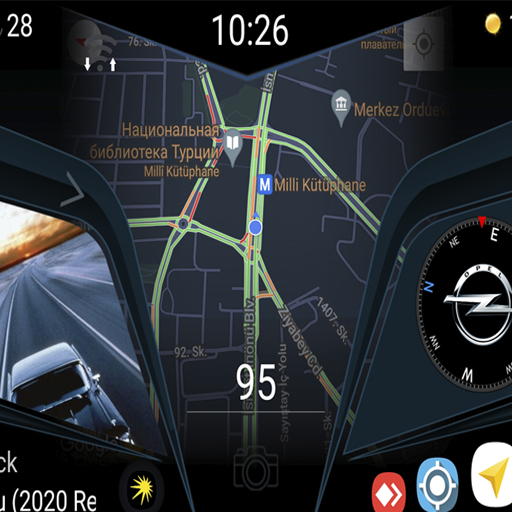
CL Theme Line
CL Theme Line
The new theme is only for the Car Launcher Free/Pro app.
Make sure that the Car Launcher app from apps lab studio is installed on your device. The theme does not function without the Car Launcher application installed.
How to install the theme:
1. Open the Car Launcher.
2. Open the settings and click "Choose a theme".
3. Click on the desired theme.
Enjoy it! CL Theme Line , a leading app in the Auto & Vehicles Apps category, boasts a robust user base with a total of 3M installs. It sees impressive engagement 3K daily installs, reflecting its popularity and usability. The app generates significant monthly revenue, indicative of its effective monetization strategies and user satisfaction. The app supports in-app purchases, allowing users to enhance their experience with additional features and content. CL Theme Line was first released April 05, 2024, and has been continually updated, with the latest update rolled out just July 15, 2025. This commitment to regular updates ensures that users always have access to the latest features and improvements. The app and is currently on version 1.3. CL Theme Line maintains a strong presence in the market, supported by numerous rating votes that attest to its reliability and effectiveness in helping users achieve their Top charts paid play goals.
Make sure that the Car Launcher app from apps lab studio is installed on your device. The theme does not function without the Car Launcher application installed.
How to install the theme:
1. Open the Car Launcher.
2. Open the settings and click "Choose a theme".
3. Click on the desired theme.
Enjoy it! CL Theme Line , a leading app in the Auto & Vehicles Apps category, boasts a robust user base with a total of 3M installs. It sees impressive engagement 3K daily installs, reflecting its popularity and usability. The app generates significant monthly revenue, indicative of its effective monetization strategies and user satisfaction. The app supports in-app purchases, allowing users to enhance their experience with additional features and content. CL Theme Line was first released April 05, 2024, and has been continually updated, with the latest update rolled out just July 15, 2025. This commitment to regular updates ensures that users always have access to the latest features and improvements. The app and is currently on version 1.3. CL Theme Line maintains a strong presence in the market, supported by numerous rating votes that attest to its reliability and effectiveness in helping users achieve their Top charts paid play goals.

Blue Disc
Blue Disc
DISCLAIMER
Blue Disc is a private and independent application. It does not represent, is not affiliated with, and is not sponsored by any government entity or authority.
SOURCE OF INFORMATION
The calculation rules used in this application are based on:
Switzerland: Art. 48 of the Road Sign Ordinance (OSR) https://www.fedlex.admin.ch/eli/cc/1979/1961_1961_1961/#art_48
France: Road Traffic Code (Code de la route)
Germany: § 13 and § 42 (Zeichen 314) of the German Road Traffic Regulations (StVO)
Have you ever been caught out by a fine because you forgot the time on your parking disc? Blue Disc is here to help.
This app automatically calculates your parking time limit and sends you a notification before it expires. No need to keep watching the clock—the app handles it for you.
HOW IT WORKS
- Park and set your physical blue disc as usual
- Tap "I am parking now" in the app
- Receive an alert before the authorized time ends
- That's it. Simple and efficient.
FEATURES
- Automatic calculation according to Swiss, French, and German rules
- Public holidays taken into account
- Find blue zone parking spots around you with interactive map
- Real-time countdown
- Warning notification before expiration
- Manual arrival time selection if you parked earlier
- Intuitive interface with disc visualization
REGULATORY COMPLIANCE
The application complies with local regulations:
Switzerland: Rounding up to the next half-hour, lunch exception
France: Management of lunch break interruptions (e.g. 12pm-2pm not counted) and variable parking durations
Germany: Rounding up to the next half-hour for the start of parking
CUSTOMIZABLE SETTINGS
- Disc requirement period (start and end times)
- Morning free time
- Warning time before expiration (5, 10, 15 minutes...)
IMPORTANT NOTE
This application does not replace the physical parking disc, which remains mandatory. It accompanies you by reminding you when your time is almost up.
PRIVACY
- No account required
- Works offline
- No data collected
- Ad-free
Download Blue Disc and avoid unpleasant surprises when returning to your car. Blue Disc , a leading app in the Auto & Vehicles Apps category, boasts a robust user base with a total of 48K installs. It sees impressive engagement , reflecting its popularity and usability. The app generates significant monthly revenue, indicative of its effective monetization strategies and user satisfaction. The app supports in-app purchases, allowing users to enhance their experience with additional features and content. Blue Disc was first released February 07, 2026, and has been continually updated, with the latest update rolled out just February 26, 2026. This commitment to regular updates ensures that users always have access to the latest features and improvements. The app and is currently on version 1.2.1. Blue Disc maintains a strong presence in the market, supported by numerous rating votes that attest to its reliability and effectiveness in helping users achieve their Top charts paid play goals.
Blue Disc is a private and independent application. It does not represent, is not affiliated with, and is not sponsored by any government entity or authority.
SOURCE OF INFORMATION
The calculation rules used in this application are based on:
Switzerland: Art. 48 of the Road Sign Ordinance (OSR) https://www.fedlex.admin.ch/eli/cc/1979/1961_1961_1961/#art_48
France: Road Traffic Code (Code de la route)
Germany: § 13 and § 42 (Zeichen 314) of the German Road Traffic Regulations (StVO)
Have you ever been caught out by a fine because you forgot the time on your parking disc? Blue Disc is here to help.
This app automatically calculates your parking time limit and sends you a notification before it expires. No need to keep watching the clock—the app handles it for you.
HOW IT WORKS
- Park and set your physical blue disc as usual
- Tap "I am parking now" in the app
- Receive an alert before the authorized time ends
- That's it. Simple and efficient.
FEATURES
- Automatic calculation according to Swiss, French, and German rules
- Public holidays taken into account
- Find blue zone parking spots around you with interactive map
- Real-time countdown
- Warning notification before expiration
- Manual arrival time selection if you parked earlier
- Intuitive interface with disc visualization
REGULATORY COMPLIANCE
The application complies with local regulations:
Switzerland: Rounding up to the next half-hour, lunch exception
France: Management of lunch break interruptions (e.g. 12pm-2pm not counted) and variable parking durations
Germany: Rounding up to the next half-hour for the start of parking
CUSTOMIZABLE SETTINGS
- Disc requirement period (start and end times)
- Morning free time
- Warning time before expiration (5, 10, 15 minutes...)
IMPORTANT NOTE
This application does not replace the physical parking disc, which remains mandatory. It accompanies you by reminding you when your time is almost up.
PRIVACY
- No account required
- Works offline
- No data collected
- Ad-free
Download Blue Disc and avoid unpleasant surprises when returning to your car. Blue Disc , a leading app in the Auto & Vehicles Apps category, boasts a robust user base with a total of 48K installs. It sees impressive engagement , reflecting its popularity and usability. The app generates significant monthly revenue, indicative of its effective monetization strategies and user satisfaction. The app supports in-app purchases, allowing users to enhance their experience with additional features and content. Blue Disc was first released February 07, 2026, and has been continually updated, with the latest update rolled out just February 26, 2026. This commitment to regular updates ensures that users always have access to the latest features and improvements. The app and is currently on version 1.2.1. Blue Disc maintains a strong presence in the market, supported by numerous rating votes that attest to its reliability and effectiveness in helping users achieve their Top charts paid play goals.

Taximeter
Taximeter
An accurate Android™ taximeter designed in conjunction with drivers and regulators. Join the thousands of professional drivers already using Taximeter worldwide.
🚖 FEATURES
✔ Realistic “LED effect” appearance and operation
✔ More than 200 predefined presets in over 40 countries ( Link: https://bit.ly/3xsjOSh )
✔ Latest presets can be downloaded from the internet and Planet Coops will add your rates free of charge for your drivers to download
✔ Customizable preset with up to 10 tariffs
✔ Custom preset wizard for easy setup
✔ Lockable preset/settings
✔ Calendar controlled (with tariff auto-switch) or manual tariffs
✔ Location controlled tariffs (geofencing)
✔ Ahead-of-time programming of future tariffs
✔ Extras (itemized extras can be programmed via XML)
✔ Minimum fare
✔ Tax
✔ Discounts
✔ Tips
✔ Yards/meters units
✔ Hire log (text and/or csv format) with automatic send via email
💳 Integration with PayPal POS™, Square POS™, or SumUp™ payment processing
✔ Generate a PDF receipt which can be emailed or printed through the Android Print Service (Android KitKat or later required). Links can be sent via SMS or viewed as a QR code when cloud storage is enabled.
✔ Receipt printing (Planet Coops’ POS Print https://play.google.com/store/apps/details?id=com.planetcoops.android.posprint app and a compatible Bluetooth mobile printer are required)
💡 Roof light control (a compatible Bluetooth switch is required)
✔ Event log with alerts
✔ Resettable totals
✔ Talking taximeter for the sight impaired
✔ Use On-Board Diagnostics (OBD) speed data to calculate distance instead of GPS (an OBD-II compliant vehicle and an ELM327 compatible Bluetooth, Wi-Fi or USB OBD-II adapter are required. If you are planning to use a USB adapter check that your device is running Android™ 3.1+ and supports USB host mode.)
✔ OBD calibration function
✔ Support for wireless GPS receivers
✔ Use the Preset Update Service https://play.google.com/store/apps/details?id=com.planetcoops.android.presetupdater to automatically keep your rates up-to-date
✔ Data logging - log GPS position, meter state and fares to the cloud (incurs a small monthly charge to contribute to server costs). A basic online tracking facility is available should you choose this option.
✔ API for integration with third party dispatch systems. Remote API access from different devices on the same network is possible using the Taximeter Proxy Service app.
✔ Backup and restore settings
✔ Supports Samsung Multi Window™, LG Dual Window™ & Android™ Multi-Window
✔ Screen saver
✔ Floating widget
✔ User guide ( Link: https://bit.ly/3pEHqzW )
🚖 APPLICATIONS
• Private hire
• Medical transportation
• Limousine
• Courier
• Airport transfers
• Avoid being ripped off overseas
• Carpooling
• Family "taxi"
Visit our website, Link: https://taximeter.planetcoops.com, for the user guide and preset information... Taximeter , a leading app in the Auto & Vehicles Apps category, boasts a robust user base with a total of 22M installs. It sees impressive engagement 53K daily installs, reflecting its popularity and usability. The app generates significant monthly revenue, indicative of its effective monetization strategies and user satisfaction. The app supports in-app purchases, allowing users to enhance their experience with additional features and content. Taximeter was first released October 23, 2010, and has been continually updated, with the latest update rolled out just February 06, 2026. This commitment to regular updates ensures that users always have access to the latest features and improvements. The app and is currently on version 1.1.147. With 128 reviews, Taximeter maintains a strong presence in the market, supported by numerous rating votes that attest to its reliability and effectiveness in helping users achieve their Top charts paid play goals.
🚖 FEATURES
✔ Realistic “LED effect” appearance and operation
✔ More than 200 predefined presets in over 40 countries ( Link: https://bit.ly/3xsjOSh )
✔ Latest presets can be downloaded from the internet and Planet Coops will add your rates free of charge for your drivers to download
✔ Customizable preset with up to 10 tariffs
✔ Custom preset wizard for easy setup
✔ Lockable preset/settings
✔ Calendar controlled (with tariff auto-switch) or manual tariffs
✔ Location controlled tariffs (geofencing)
✔ Ahead-of-time programming of future tariffs
✔ Extras (itemized extras can be programmed via XML)
✔ Minimum fare
✔ Tax
✔ Discounts
✔ Tips
✔ Yards/meters units
✔ Hire log (text and/or csv format) with automatic send via email
💳 Integration with PayPal POS™, Square POS™, or SumUp™ payment processing
✔ Generate a PDF receipt which can be emailed or printed through the Android Print Service (Android KitKat or later required). Links can be sent via SMS or viewed as a QR code when cloud storage is enabled.
✔ Receipt printing (Planet Coops’ POS Print https://play.google.com/store/apps/details?id=com.planetcoops.android.posprint app and a compatible Bluetooth mobile printer are required)
💡 Roof light control (a compatible Bluetooth switch is required)
✔ Event log with alerts
✔ Resettable totals
✔ Talking taximeter for the sight impaired
✔ Use On-Board Diagnostics (OBD) speed data to calculate distance instead of GPS (an OBD-II compliant vehicle and an ELM327 compatible Bluetooth, Wi-Fi or USB OBD-II adapter are required. If you are planning to use a USB adapter check that your device is running Android™ 3.1+ and supports USB host mode.)
✔ OBD calibration function
✔ Support for wireless GPS receivers
✔ Use the Preset Update Service https://play.google.com/store/apps/details?id=com.planetcoops.android.presetupdater to automatically keep your rates up-to-date
✔ Data logging - log GPS position, meter state and fares to the cloud (incurs a small monthly charge to contribute to server costs). A basic online tracking facility is available should you choose this option.
✔ API for integration with third party dispatch systems. Remote API access from different devices on the same network is possible using the Taximeter Proxy Service app.
✔ Backup and restore settings
✔ Supports Samsung Multi Window™, LG Dual Window™ & Android™ Multi-Window
✔ Screen saver
✔ Floating widget
✔ User guide ( Link: https://bit.ly/3pEHqzW )
🚖 APPLICATIONS
• Private hire
• Medical transportation
• Limousine
• Courier
• Airport transfers
• Avoid being ripped off overseas
• Carpooling
• Family "taxi"
Visit our website, Link: https://taximeter.planetcoops.com, for the user guide and preset information... Taximeter , a leading app in the Auto & Vehicles Apps category, boasts a robust user base with a total of 22M installs. It sees impressive engagement 53K daily installs, reflecting its popularity and usability. The app generates significant monthly revenue, indicative of its effective monetization strategies and user satisfaction. The app supports in-app purchases, allowing users to enhance their experience with additional features and content. Taximeter was first released October 23, 2010, and has been continually updated, with the latest update rolled out just February 06, 2026. This commitment to regular updates ensures that users always have access to the latest features and improvements. The app and is currently on version 1.1.147. With 128 reviews, Taximeter maintains a strong presence in the market, supported by numerous rating votes that attest to its reliability and effectiveness in helping users achieve their Top charts paid play goals.

Fahrtenbuch
Fahrtenbuch
Das erfolgreiche Smartphone-Fahrtenbuch jetzt auch für Android verfügbar. Gute Fahrt!
Herzlich Willkommen an alle die Fahrtenbuch erstmals nutzen!
Das Fahrtenbuch liegt auf den Knien und der Kugelschreiber ausgelaufen im Handschuhfach... Das hat jetzt ein Ende!
Tipps zur Einrichtung und weitere Neuigkeiten finden Sie unter
☞ https://www.android-fahrtenbuch.com
Easy Switch: Datensicherungen können über die Dropbox eingelesenen werden und sind 100% kompatibel mit älteren Backups unserer App
Gute Fahrt und vielen Dank an alle Nutzer, die mit Geduld die Android-Version erwartet haben und sie nun endlich in den Händen halten.
✔ Keine Registrierung!
✔ Keine laufenden Kosten!
✔ Kein Abo, https://fahrtenbuch.cloud Desktop Sync | Flottenverwaltung optional!
✔ Keine weitere Hardware (OBDII Dongle o.ä.) nötig!
✔ Kann Änderungssicher geführt werden | Pro Fahrzeug einstellbar!
✔ Von DATEV explizit empfohlen!
Datenschutz
Erfassen Sie Ihre Fahrten mit dem Fahrtenbuch für Ihr Android Gerät. Zwei Klicks und Abfahrt! Mit dem InApp Kauf "Exakte Streckenaufzeichnung" den wir dringend empfehlen bekommen Sie als kleines "Bonbon" auch die Autostart-Funktion als Gratis Zugabe!
Es braucht nur zwei Berührungen des Bildschirms, und schon kann die Fahrt beginnen. Der Grund kann auch später noch gewählt werden, entweder als freier Text oder aus einer Liste eigener Favoriten. Die Position wird automatisch erkannt und eingetragen, oder auch direkt aus dem Adressbuch übernommen werden kann.
Sie können ein preiswertes GPS Tracking Modul als InApp Kauf erwerben und "metergenau" aufzeichnen - Wir raten dazu "Exakte Streckenaufzeichnung" für beste Ergebnisse zu aktivieren! Alternativ wird die Entfernung aus Kartendiensten geschätzt und muss nur noch kurz kontrolliert oder ggf. nach Tageskilometerstand angepasst werden.
Die optimale Ergänzung zur Fahrtenbuch Auswertung am Mac:
☞ "Fahrtenbuch | Maps" für macOS im Mac App Store!
Die optionale Ergänzung zur Fahrtenbuch Bearbeitung am Desktop:
☞ https://fahrtenbuch.cloud
ACHTUNG | ☞ Sie verwenden ein Android Samsung Gerät, beachten Sie in den Samsung Energiespareinstellungen Fahrtenbuch dauerhaft die Ortung zu erlauben! In der App-Energieüberwachung müssen Sie Fahrtenbuch ausschließen um die Streckenaufzeichnung zu gewährleisten! Sie finden die Einstellung unter: Einstellungen -> Gerätewartung -> Akku ->
ACHTUNG | ☞ Sie verwenden ein Android Gerät anderer Hersteller mit speziellen Energiesparfunktionen, beachten Sie "Energy Saving Modes" diverser Hersteller, ggf. benötigt Fahrtenbuch dauerhaft ein "Whitelisting" um die Ortung zu erlauben und das Betriebssystem daran zu hindern Fahrtenbuch im Hintergrund einfach zu beenden! In der App-Energieüberwachung müssen Sie Fahrtenbuch ausschließen um die Streckenaufzeichnung zu gewährleisten!
ACHTUNG | ☞ Stellen Sie die GPS Genauigkeit am besten auf "hohe Genauigkeit"!
Formate & Exportschnittstellen:
★ PDF
★ CSV (Komma-, Tabulator-, Semikolon-, Trennzeichen)
★ Zertifizierte GoBD Export Schnittstelle | InApp Kauf
★ WISO Fahrtenbuch | InApp Kauf
★ DATEV Fahrtenbuch | InApp Kauf
★ Lexware Reisekosten | InApp Kauf
★ INtex Fahrtenbuch | InApp Kauf
★ Euro-Fahrtenbuch | InApp Kauf
★ Fahrzeug Pro Fahrtenbuch | InApp Kauf
★ Fahrtenbuch Express | InApp Kauf
★ MonKey Reisekosten | InApp Kauf
Exportmöglichkeiten:
★ Dropbox
★ Mail im Klartext
★ Mail als Anhang
★ Google-Drive
★ Auf Gerät öffnen
Auf Ihrem Mac oder PC können Sie Ihre Daten anschließend über Schnittstellen so ganz einfach in verschiedene Desktop Fahrtenbücher importieren wenn gewünscht.
WICHTIG: Machen Sie regelmäßig Datensicherungen und übertragen die Daten in ein Programm auf Ihrem Rechner. Wir haften nicht für Verlust der erfassten Daten.
Für weitere Informationen und Support nutzen Sie bitte unserer Website.
Vielen Dank!
(Spritpreise by tankerkoenig.de) Fahrtenbuch , a leading app in the Auto & Vehicles Apps category, boasts a robust user base with a total of 12M installs. It sees impressive engagement , reflecting its popularity and usability. The app generates significant monthly revenue, indicative of its effective monetization strategies and user satisfaction. The app supports in-app purchases, allowing users to enhance their experience with additional features and content. Fahrtenbuch was first released October 27, 2017, and has been continually updated, with the latest update rolled out just January 28, 2026. This commitment to regular updates ensures that users always have access to the latest features and improvements. The app and is currently on version 9.8.30. With 263 reviews, Fahrtenbuch maintains a strong presence in the market, supported by numerous rating votes that attest to its reliability and effectiveness in helping users achieve their Top charts paid play goals.
Herzlich Willkommen an alle die Fahrtenbuch erstmals nutzen!
Das Fahrtenbuch liegt auf den Knien und der Kugelschreiber ausgelaufen im Handschuhfach... Das hat jetzt ein Ende!
Tipps zur Einrichtung und weitere Neuigkeiten finden Sie unter
☞ https://www.android-fahrtenbuch.com
Easy Switch: Datensicherungen können über die Dropbox eingelesenen werden und sind 100% kompatibel mit älteren Backups unserer App
Gute Fahrt und vielen Dank an alle Nutzer, die mit Geduld die Android-Version erwartet haben und sie nun endlich in den Händen halten.
✔ Keine Registrierung!
✔ Keine laufenden Kosten!
✔ Kein Abo, https://fahrtenbuch.cloud Desktop Sync | Flottenverwaltung optional!
✔ Keine weitere Hardware (OBDII Dongle o.ä.) nötig!
✔ Kann Änderungssicher geführt werden | Pro Fahrzeug einstellbar!
✔ Von DATEV explizit empfohlen!
Datenschutz
Erfassen Sie Ihre Fahrten mit dem Fahrtenbuch für Ihr Android Gerät. Zwei Klicks und Abfahrt! Mit dem InApp Kauf "Exakte Streckenaufzeichnung" den wir dringend empfehlen bekommen Sie als kleines "Bonbon" auch die Autostart-Funktion als Gratis Zugabe!
Es braucht nur zwei Berührungen des Bildschirms, und schon kann die Fahrt beginnen. Der Grund kann auch später noch gewählt werden, entweder als freier Text oder aus einer Liste eigener Favoriten. Die Position wird automatisch erkannt und eingetragen, oder auch direkt aus dem Adressbuch übernommen werden kann.
Sie können ein preiswertes GPS Tracking Modul als InApp Kauf erwerben und "metergenau" aufzeichnen - Wir raten dazu "Exakte Streckenaufzeichnung" für beste Ergebnisse zu aktivieren! Alternativ wird die Entfernung aus Kartendiensten geschätzt und muss nur noch kurz kontrolliert oder ggf. nach Tageskilometerstand angepasst werden.
Die optimale Ergänzung zur Fahrtenbuch Auswertung am Mac:
☞ "Fahrtenbuch | Maps" für macOS im Mac App Store!
Die optionale Ergänzung zur Fahrtenbuch Bearbeitung am Desktop:
☞ https://fahrtenbuch.cloud
ACHTUNG | ☞ Sie verwenden ein Android Samsung Gerät, beachten Sie in den Samsung Energiespareinstellungen Fahrtenbuch dauerhaft die Ortung zu erlauben! In der App-Energieüberwachung müssen Sie Fahrtenbuch ausschließen um die Streckenaufzeichnung zu gewährleisten! Sie finden die Einstellung unter: Einstellungen -> Gerätewartung -> Akku ->
ACHTUNG | ☞ Sie verwenden ein Android Gerät anderer Hersteller mit speziellen Energiesparfunktionen, beachten Sie "Energy Saving Modes" diverser Hersteller, ggf. benötigt Fahrtenbuch dauerhaft ein "Whitelisting" um die Ortung zu erlauben und das Betriebssystem daran zu hindern Fahrtenbuch im Hintergrund einfach zu beenden! In der App-Energieüberwachung müssen Sie Fahrtenbuch ausschließen um die Streckenaufzeichnung zu gewährleisten!
ACHTUNG | ☞ Stellen Sie die GPS Genauigkeit am besten auf "hohe Genauigkeit"!
Formate & Exportschnittstellen:
★ CSV (Komma-, Tabulator-, Semikolon-, Trennzeichen)
★ Zertifizierte GoBD Export Schnittstelle | InApp Kauf
★ WISO Fahrtenbuch | InApp Kauf
★ DATEV Fahrtenbuch | InApp Kauf
★ Lexware Reisekosten | InApp Kauf
★ INtex Fahrtenbuch | InApp Kauf
★ Euro-Fahrtenbuch | InApp Kauf
★ Fahrzeug Pro Fahrtenbuch | InApp Kauf
★ Fahrtenbuch Express | InApp Kauf
★ MonKey Reisekosten | InApp Kauf
Exportmöglichkeiten:
★ Dropbox
★ Mail im Klartext
★ Mail als Anhang
★ Google-Drive
★ Auf Gerät öffnen
Auf Ihrem Mac oder PC können Sie Ihre Daten anschließend über Schnittstellen so ganz einfach in verschiedene Desktop Fahrtenbücher importieren wenn gewünscht.
WICHTIG: Machen Sie regelmäßig Datensicherungen und übertragen die Daten in ein Programm auf Ihrem Rechner. Wir haften nicht für Verlust der erfassten Daten.
Für weitere Informationen und Support nutzen Sie bitte unserer Website.
Vielen Dank!
(Spritpreise by tankerkoenig.de) Fahrtenbuch , a leading app in the Auto & Vehicles Apps category, boasts a robust user base with a total of 12M installs. It sees impressive engagement , reflecting its popularity and usability. The app generates significant monthly revenue, indicative of its effective monetization strategies and user satisfaction. The app supports in-app purchases, allowing users to enhance their experience with additional features and content. Fahrtenbuch was first released October 27, 2017, and has been continually updated, with the latest update rolled out just January 28, 2026. This commitment to regular updates ensures that users always have access to the latest features and improvements. The app and is currently on version 9.8.30. With 263 reviews, Fahrtenbuch maintains a strong presence in the market, supported by numerous rating votes that attest to its reliability and effectiveness in helping users achieve their Top charts paid play goals.

Wallbox control
Wallbox control
(although the screenshots are in German, the app is localized to English now!)
With this app you can switch the charging process of the supported chargers on and off and define the charging current. And with go-eCharger also the desired charge quantity.
You can also choose the energy to charge (if supported by the wallbox) as well as set a timer to start charging.
It is also possible to carry out automatic charge current control for supported photovoltaic systems in order to draw as little charge current as possible from the grid. See below.
A detailed description with instructions etc. can be found at
https://android.chk.digital/ecar-charger-control/
Please read description to end, it's not much ;)
This is not via the cloud, but a direct access to the wallbox in the local network. Faster than via the cloud, independent of external computers, and faster than using a browser.
Of course, the app also supports access via access points (e.g. if the garage is connected via cable/AP) or VPN.
Currently supported ("Work in Progress" - please feel free to suggest new ones):
* Go-eCharger
* Keba P20/P30 c und X
* BMW
* Phoenix EV Charge Control EM-CP-PP-ETH
* Walli Light Pro (contains Phoenix EV Charge Control EM-CP-PP-ETH)
* nrgKick Connect
* SimpleEVSE/WiFi (Normal Mode & Always Active)
* SmartWB (contains SimpleEVSE/Wifi)
* Wallbe Eco 2.0 (s)
* cFos Power Brain (with&without S0)
* TP-Link Wifi Plug Kasa System
It can also optionally log when and which action was performed, with load quantities etc., also a widget for fast access is included.
For charging the photovoltaic system, support is currently being provided (also "Work in Progress" - please contact me if necessary):
* Sonnen (REST und JSON) (+battery if present)
* Kostal Pico oder Plenticore (+battery if present)
* E3/DC Simple (Modbus) (+battery if present)
* Fronius (JSON und Modbus) (+battery if present)
* SolarEdge (Cloud) (+battery if present)
* SolarEdge (modbus) (no battery)
* Fronius Energy Meter (JSON) (no battery)
* Generic JSON
* Senec Home V2
* SMA Energy Meter (Speedwire) (no battery)
* SMA Sunny Home Manager -> SMA Energy Meter
* Solar Log
* RTC Power
* Kostal Smart Energy Meter (Modbus) (no battery)
* Energy Manager EM300-LR (JSON) (no battery)
Yes, I know the app is not free, it costs a beer - at least here in Southern Germany. But my working time isn't free either, and Google doesn't allow donations. But it is guaranteed to be free of advertising, espionage and data collection. And: also desires or Wallbox inquiries are in demand!
In case of dissatisfaction I still pay back the money after a few days. Wallbox control , a leading app in the Auto & Vehicles Apps category, boasts a robust user base with a total of 4M installs. It sees impressive engagement 49K daily installs, reflecting its popularity and usability. The app generates significant monthly revenue, indicative of its effective monetization strategies and user satisfaction. The app supports in-app purchases, allowing users to enhance their experience with additional features and content. Wallbox control was first released January 27, 2019, and has been continually updated, with the latest update rolled out just March 26, 2026. This commitment to regular updates ensures that users always have access to the latest features and improvements. The app and is currently on version 2.301.2213. With 152 reviews, Wallbox control maintains a strong presence in the market, supported by numerous rating votes that attest to its reliability and effectiveness in helping users achieve their Top charts paid play goals.
With this app you can switch the charging process of the supported chargers on and off and define the charging current. And with go-eCharger also the desired charge quantity.
You can also choose the energy to charge (if supported by the wallbox) as well as set a timer to start charging.
It is also possible to carry out automatic charge current control for supported photovoltaic systems in order to draw as little charge current as possible from the grid. See below.
A detailed description with instructions etc. can be found at
https://android.chk.digital/ecar-charger-control/
Please read description to end, it's not much ;)
This is not via the cloud, but a direct access to the wallbox in the local network. Faster than via the cloud, independent of external computers, and faster than using a browser.
Of course, the app also supports access via access points (e.g. if the garage is connected via cable/AP) or VPN.
Currently supported ("Work in Progress" - please feel free to suggest new ones):
* Go-eCharger
* Keba P20/P30 c und X
* BMW
* Phoenix EV Charge Control EM-CP-PP-ETH
* Walli Light Pro (contains Phoenix EV Charge Control EM-CP-PP-ETH)
* nrgKick Connect
* SimpleEVSE/WiFi (Normal Mode & Always Active)
* SmartWB (contains SimpleEVSE/Wifi)
* Wallbe Eco 2.0 (s)
* cFos Power Brain (with&without S0)
* TP-Link Wifi Plug Kasa System
It can also optionally log when and which action was performed, with load quantities etc., also a widget for fast access is included.
For charging the photovoltaic system, support is currently being provided (also "Work in Progress" - please contact me if necessary):
* Sonnen (REST und JSON) (+battery if present)
* Kostal Pico oder Plenticore (+battery if present)
* E3/DC Simple (Modbus) (+battery if present)
* Fronius (JSON und Modbus) (+battery if present)
* SolarEdge (Cloud) (+battery if present)
* SolarEdge (modbus) (no battery)
* Fronius Energy Meter (JSON) (no battery)
* Generic JSON
* Senec Home V2
* SMA Energy Meter (Speedwire) (no battery)
* SMA Sunny Home Manager -> SMA Energy Meter
* Solar Log
* RTC Power
* Kostal Smart Energy Meter (Modbus) (no battery)
* Energy Manager EM300-LR (JSON) (no battery)
Yes, I know the app is not free, it costs a beer - at least here in Southern Germany. But my working time isn't free either, and Google doesn't allow donations. But it is guaranteed to be free of advertising, espionage and data collection. And: also desires or Wallbox inquiries are in demand!
In case of dissatisfaction I still pay back the money after a few days. Wallbox control , a leading app in the Auto & Vehicles Apps category, boasts a robust user base with a total of 4M installs. It sees impressive engagement 49K daily installs, reflecting its popularity and usability. The app generates significant monthly revenue, indicative of its effective monetization strategies and user satisfaction. The app supports in-app purchases, allowing users to enhance their experience with additional features and content. Wallbox control was first released January 27, 2019, and has been continually updated, with the latest update rolled out just March 26, 2026. This commitment to regular updates ensures that users always have access to the latest features and improvements. The app and is currently on version 2.301.2213. With 152 reviews, Wallbox control maintains a strong presence in the market, supported by numerous rating votes that attest to its reliability and effectiveness in helping users achieve their Top charts paid play goals.

CL Theme C1
CL Theme C1
Warning.
This is not an application, but a theme for Car Launcher.
Introducing a new theme for Car Launcher v 4.5+.
How to install the theme:
1. Open Car Launcher.
2. Open the settings and click "Select Theme".
3. Click on the desired theme. CL Theme C1 , a leading app in the Auto & Vehicles Apps category, boasts a robust user base with a total of 3M installs. It sees impressive engagement 58K daily installs, reflecting its popularity and usability. The app generates significant monthly revenue, indicative of its effective monetization strategies and user satisfaction. The app supports in-app purchases, allowing users to enhance their experience with additional features and content. CL Theme C1 was first released December 18, 2024, and has been continually updated, with the latest update rolled out just July 08, 2025. This commitment to regular updates ensures that users always have access to the latest features and improvements. The app and is currently on version 1.3. CL Theme C1 maintains a strong presence in the market, supported by numerous rating votes that attest to its reliability and effectiveness in helping users achieve their Top charts paid play goals.
This is not an application, but a theme for Car Launcher.
Introducing a new theme for Car Launcher v 4.5+.
How to install the theme:
1. Open Car Launcher.
2. Open the settings and click "Select Theme".
3. Click on the desired theme. CL Theme C1 , a leading app in the Auto & Vehicles Apps category, boasts a robust user base with a total of 3M installs. It sees impressive engagement 58K daily installs, reflecting its popularity and usability. The app generates significant monthly revenue, indicative of its effective monetization strategies and user satisfaction. The app supports in-app purchases, allowing users to enhance their experience with additional features and content. CL Theme C1 was first released December 18, 2024, and has been continually updated, with the latest update rolled out just July 08, 2025. This commitment to regular updates ensures that users always have access to the latest features and improvements. The app and is currently on version 1.3. CL Theme C1 maintains a strong presence in the market, supported by numerous rating votes that attest to its reliability and effectiveness in helping users achieve their Top charts paid play goals.