
Audio Recorder, Speech to Text
Best Record Voice Memo & Transcribe Images and Marketing Description


Need to dictate a note, turn speech to text, or transcribe a voice memo on iPhone? Record Voice Memo & Transcribe is a dictation app and voice recorder that converts voice to text while you speak.
Record Voice Memo & Transcribe is a speech to text app for iPhone and iPad that has:
- Dictation app to dictate voice memos and get them as text
- Voice to text converter for live speech and saved recordings
- Voice recorder to record audio, lectures, meetings and interviews
- AI transcriber with speaker identification, summaries and translation
- Audio editor to trim MP3, M4A, WAV and AMR files
Dictate Voice Memos
Dictation app in Record Voice Memo & Transcribe is built around the voice memo. Dictate an idea, a reminder or a quick recap after a call, and it is saved as a voice memo with its transcript attached. Talk to text on a walk, in the car or between meetings, then read the memo instead of listening to it again. Each dictated voice memo keeps the original audio next to the text, so you can replay the exact words, edit the transcript, and share it to any app on iPhone or iPad.
Voice to Text in Real Time
Voice to text converter shows words on screen while the speaker is still talking. Real-time transcription helps you follow a lecture, keep up in a fast meeting, or read speech when the audio is hard to hear. Voice recording works offline, so no voice memo is lost in airplane mode, on the subway or anywhere without signal.
Speech to Text for Recordings & Files
Speech to text engine also works after the recording ends. Import audio files and video files, and the transcription app will transcribe audio to text. Transcribe voice memos, podcasts, lecture recordings, interview audio and video clips. Speaker identification labels who said what, so a transcript of a three-person interview reads like a script instead of one long block of text.
Voice Recorder & Voice Memos
Voice recorder captures clear audio on iPhone and iPad, online or offline. Use the audio recorder as a lecture recorder in class, a meeting recorder at work, or an interview recorder for research and journalism. Every voice memo is stored together with its transcript. Audio editor trims recordings, so only the part you need goes into the final file.
AI Notes from Every Recording
AI note taker turns a long transcript into a short summary with key points. Chat with your audio: ask the recording what was decided, which action items came up, or what a speaker said on a topic, and get an answer based on the transcript. Translate transcripts into other languages to share notes with an international team.
Export, Share & Back Up
- Export transcripts as text or as SRT subtitles for video
- Back up recordings to Google Drive, Dropbox or OneDrive
- Share audio files and transcripts with colleagues and classmates
Who Uses Record Voice Memo & Transcribe
Students record lectures and turn them into study notes. Journalists and researchers transcribe interviews with speaker labels. Professionals dictate emails and capture meeting minutes. Writers dictate drafts and keep voice journals. People who are hard of hearing read real-time transcription of a conversation as text.
Questions & Answers
How do I convert a voice memo to text on iPhone?
Open Record Voice Memo & Transcribe, record a new voice memo or import an audio file, and the app transcribes the speech to text.
Can I record without an internet connection?
Yes. Voice recording works offline on iPhone and iPad, and the memo can be transcribed once the connection is back.
Can the app tell different speakers apart?
Yes. Speaker identification separates each voice in the transcript.
Which audio formats can I edit?
The audio editor trims MP3, M4A, WAV and AMR recordings.
Terms of Service: https://cubeapps.io/vt_terms.html
Privacy Policy: https://cubeapps.io/vt_privacy.html
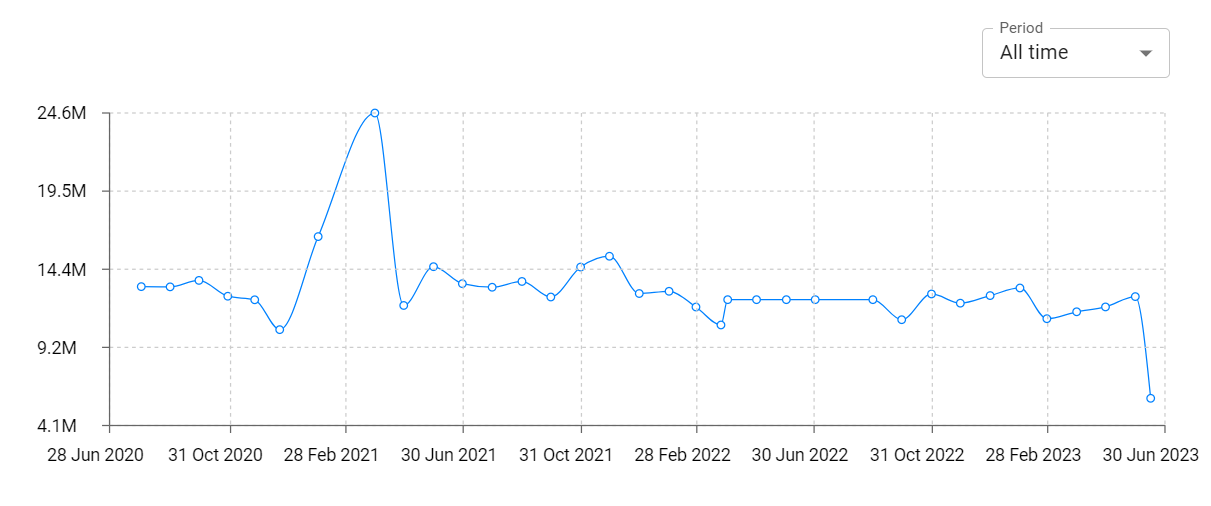
Record Voice Memo & Transcribe Revenue and Downloads
Measure Record Voice Memo & Transcribe performance and get insights with AppstoreSpy data you won’t find anywhere else using our Analytics, Revenue Stats ans Trends.
Record Voice Memo & Transcribe Global Top Charts: Interactive Map of Country and Category Rankings
Record Voice Memo & Transcribe Revenue and Installs Distribution by Countries
Record Voice Memo & Transcribe Changelog

