
Extremely Reliable Smart Lock
Best Unlock - Modern Proximity Lock Images and Marketing Description
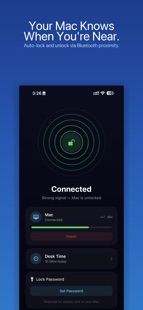


You stepped away for coffee. Your Mac was wide open.
That moment of "wait, did I lock it?" — we've all been there. At the office, at a café, even at home with curious kids around. You know you should lock your Mac every time you leave. But you're human. You forget.
Unlock makes forgetting impossible.
Keep your iPhone in your pocket — that's it. Walk away, your Mac locks. Come back, it unlocks. No buttons, no shortcuts, no habits to build.
Setup takes seconds, not minutes.
There's no pairing. No codes. No Bluetooth configuration screens. Open the app on your Mac and iPhone, and they find each other. That's the entire setup. It feels almost unfair how easy it is.
Your Apple Watch works too.
Wearing your Watch but left your iPhone charging? Unlock works with both. iPhone, Apple Watch, or both at once — your Mac responds to whichever device is with you.
Two ways to lock. Your choice.
• Overlay Lock — a custom full-screen password lock that covers every display instantly
• System Lock — triggers your Mac's native lock screen, the same one you trust today
Built for how you actually work.
• Trusted WiFi — add your home network so your Mac stays unlocked where you feel safe
• Quiet Hours — disable auto-lock during focus time, meetings, or late nights
• Adjustable Distance — fine-tune how close "close" means, from arm's reach to across the room
• Lock Delay — set a grace period (3–60 seconds) so a quick stretch doesn't trigger a lock
• Pause Timer — disable protection for 5 minutes to 2 hours with one tap
Know how your day went.
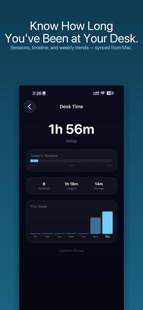
Unlock quietly tracks your desk time — total hours, session count, longest stretch, daily patterns. No spreadsheets, no timers to start. Just honest data about your work rhythm, visible right from your Mac's menu bar.
Get notified. Stay calm.
When your Mac locks, your iPhone gets a notification. Whether you're across the office or across the building — you'll know it's secure.
Nothing leaves your devices.
No accounts. No sign-ups. No cloud sync. No analytics sent anywhere. Everything — your password, your desk time data, your proximity detection — stays between your Mac and your iPhone over a direct Bluetooth connection. Period.
Runs multiple Macs.
One iPhone. Many Macs. Work machine, personal machine, studio machine — manage them all from a single device.
No subscriptions. No premium tier. No ads. Every feature, every platform, included.
At a Glance
• Locks your Mac when you walk away with your iPhone or Apple Watch
• Unlocks when you return — no password needed
• No pairing or configuration required
• Works with iPhone and Apple Watch simultaneously
• Supports multiple Macs from one device
• Overlay lock or native system lock — your choice
• Trusted WiFi networks bypass auto-lock
• Quiet hours with granular controls
• Adjustable lock distance and delay
• Built-in desk time analytics
• Push notification when Mac locks
• No accounts, no data collection, no internet required
• Launch at login — always protecting
Questions or ideas? Reach us at pawankdixit@icloud.com — we reply within 24 hours.
proximity lock, auto lock, smart lock , bluetooth lock , Mac lock , unlock Mac , screen lock , near lock , walk away lock, desk time, privacy, unlox
Unlock - Modern Proximity Lock Revenue and Downloads
Measure Unlock - Modern Proximity Lock performance and get insights with AppstoreSpy data you won’t find anywhere else using our Analytics, Revenue Stats ans Trends.
Unlock - Modern Proximity Lock Global Top Charts: Interactive Map of Country and Category Rankings
Unlock - Modern Proximity Lock Revenue and Installs Distribution by Countries
Unlock - Modern Proximity Lock Changelog

