
Microsoft Excel: Spreadsheets
Use powerful, industry-leading AI tools to generate visual charts from any data
4.7 ★
Use powerful, industry-leading AI tools to generate visual charts from any data
Best Microsoft Excel: Spreadsheets Images and Marketing Description


Spreadsheets & Calculations
• Create charts, budgets, project plans, accounting & financial analysis with Excel's modern templates.
• Use an accounting calculator, data analysis tools and familiar formulae to perform calculations.
• Work with clear, easy-to-read sheets and charts enhanced by rich formatting.
Accounting, Budget and Expense Tracking
• Budget templates and planning tools: Use ready-made spreadsheets to plan spending across categories and time frames.
• Budget Tracker: Track expenses and save money.
• Accounting Tools: Use Excel as a tax calculator for estimates, personal finances and more.
Data Analysis
• Chart maker: Annotate, edit and insert charts that bring data to life.
• Expense tracker: Track expenses with a personal budget template.
• Pivot charts and spreadsheet visualisation tools offer easily digestible formats.
Review and Edit
• File editor: Edit documents, charts and data from anywhere.
• Data analysis features like sort and filter columns.
• Annotate charts, highlight parts of worksheets and write equations with the draw tab on devices with touch capabilities.
Collaborate and Work Anywhere
• Share files and Excel sheets with just a few taps to invite others to edit, view or add comments.
• Edit and copy your worksheet in the body of an email or attach a link to your workbook.
AI Assistance with Copilot*
• Summarise data and highlight trends quickly.
• Generate charts and tables from raw data with simple prompts.
• Get intelligent recommendations for budgeting and forecasting.
REQUIREMENTS:
1 GB RAM or above
To create or edit documents, sign in with a free Microsoft account on devices with a screen size smaller than 10.1 inches.
*Unlock the full Microsoft 365 experience with a qualifying Microsoft 365 subscription for your phone, tablet, PC and Mac.
Microsoft 365 subscriptions purchased from the app will be charged to your Play Store account and will automatically renew within 24 hours prior to the end of the current subscription period, unless auto-renewal is disabled beforehand. You can manage your subscriptions in your Play Store account settings. A subscription cannot be cancelled during the active subscription period.
This app is provided by either Microsoft or a third-party app publisher and is subject to a separate privacy statement and terms and conditions. Data provided through the use of this store and this app may be accessible to Microsoft or the third-party app publisher, where applicable, and transferred to, stored and processed in the United States or any other country where Microsoft or the app publisher and their affiliates or service providers maintain facilities.
Please refer to Microsoft's EULA for Terms of Service for Microsoft 365 on Android. By installing the app, you agree to these terms and conditions: http://aka.ms/eula
Microsoft Excel: Spreadsheets Revenue and Downloads
Measure Microsoft Excel: Spreadsheets performance and get insights with AppstoreSpy data you won’t find anywhere else using our Analytics, Revenue Stats ans Trends.
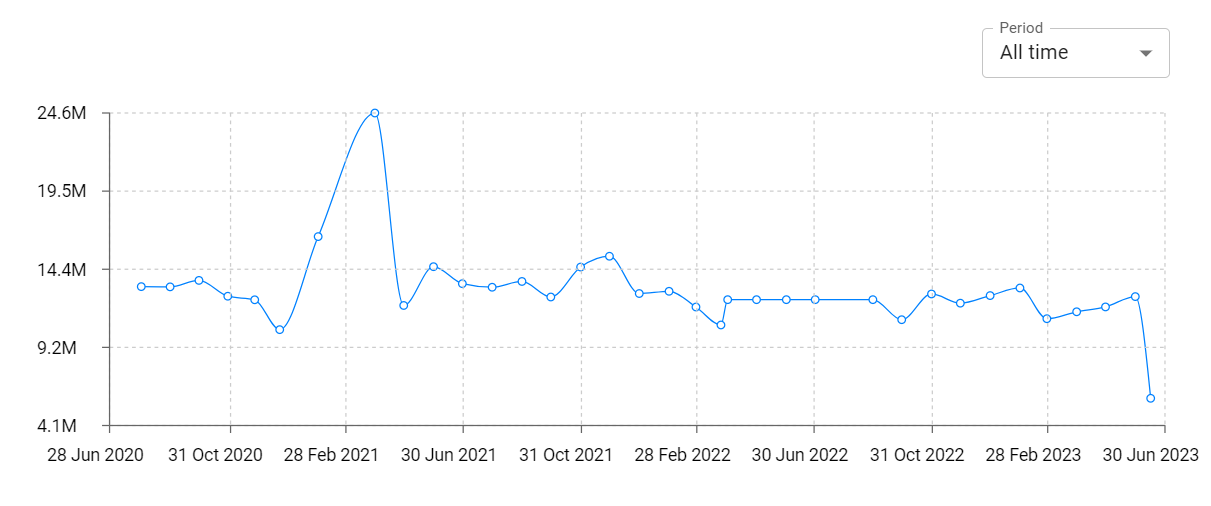
Microsoft Excel: Spreadsheets Total Installs and Downloads charts
Explore Microsoft Excel: Spreadsheets Total Installs to gain a deeper understanding of the app
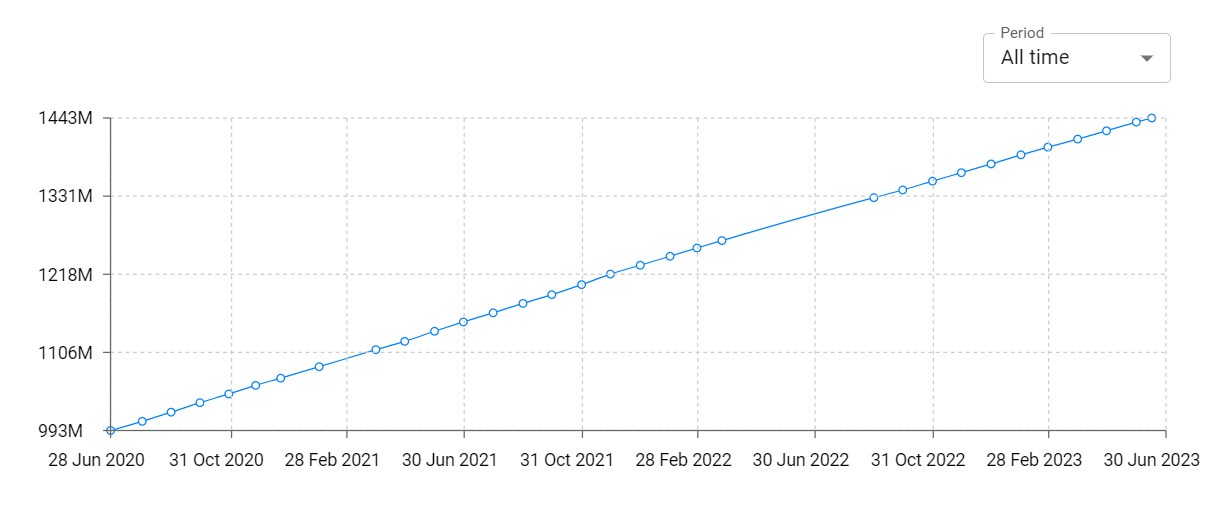
Microsoft Excel: Spreadsheets Daily Installs and Downloads charts
Explore Microsoft Excel: Spreadsheets Daily Installs to gain a deeper understanding of the app
Microsoft Excel: Spreadsheets Global Top Charts: Interactive Map of Country and Category Rankings
Microsoft Excel: Spreadsheets Revenue and Installs Distribution by Countries
Microsoft Excel: Spreadsheets Changelog

App contains SDKs
Microsoft Excel: Spreadsheets Ad сreatives

