
Glow Finger Spinner: Fun Spin
Create glow spinner fun with glow art drawing and draw finger spinner designs
| 🔒 | Avg daily installs |
|---|---|
| 5K+ | Installs 🔒 More accurate value in Pro |
| 1 month | Age |
| 1 month ago | Updated |
| Nov. 24, 2025 | Release date |
| 44Mb | Size |



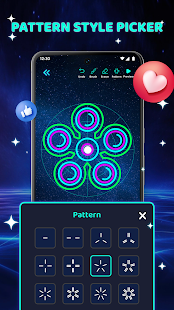
Glow Finger Spinner: Fun Spin gives you a simple way to create your own glow spinners and draw neon art. You can choose a background, pick colors, and draw lines that turn into a spinner when you preview it. The app is designed to be easy to use, so you can relax and enjoy drawing neon glow at your own pace. ✨
You can also explore a collection of ready-made spinners if you prefer to start quickly. Each spinner has a clear layout so you can choose and spin right away. The glow style and clean designs help make the experience fun and visually pleasing.
The drawing finger spinner includes tools that let you undo, erase, or switch brushes when needed. You can select patterns to create balanced shapes, try different colors with the color wheel, and see how your drawing looks when it spins. 🌈
🎨 Main Features of this glow finger spinner app:
- Draw glow spinner shapes with simple neon brushes ✏️
- Choose colors with a color picker and brightness slider with Glow Art Drawing Tools
- Use undo, brush, eraser, and pattern tools
- Try patterns to create symmetrical spinner lines
- Select from several glow backgrounds
- View and spin your saved spinners
- Start draw spinner game anytime
- Preview your drawing as a spinning design
Glow Finger Spinner: Fun Spin is made for anyone who enjoys drawing glow lines and watching them turn into smooth spinner designs. It offers a calm and simple way to be creative on your phone.
Download now and start drawing glow art, creating custom spinners, and trying your own designs in just a few steps. 🎨📥